Smart Home Security Camera Guide: 4K Local Storage vs. Cloud
This comprehensive guide delves into the merits of Smart Home Security Camera Guide: Evaluating 4K Local Storage Over Cloud Subscriptions, providing crucial insights for consumers seeking optimal home surveillance solutions without recurring fees.
Choosing the right security camera system for your home can be a daunting task, especially with the myriad of options available today. This Smart Home Security Camera Guide: Evaluating 4K Local Storage Over Cloud Subscriptions aims to simplify that decision, focusing on the increasingly popular debate between relying on local storage solutions for 4K footage versus the more common cloud-based subscriptions. As technology advances, especially with the advent of ultra-high-definition 4K cameras, understanding where your valuable surveillance data is stored and how it's accessed becomes paramount for both security and privacy.
Understanding 4K Resolution in Home Security
The jump to 4K resolution in home security cameras isn't just a marketing gimmick; it offers tangible benefits for surveillance. This section explores what 4K means for your security footage and why it's becoming a standard for those serious about protecting their property. The clarity and detail provided by 4K cameras can make a significant difference in identifying intruders or capturing crucial events.
The Visual Advantage of 4K
4K resolution, often referred to as Ultra High Definition (UHD), boasts a pixel count of 3840 x 2160. This is four times the resolution of standard 1080p HD, meaning a vastly superior image quality. For security cameras, this translates into:
- Enhanced Detail: Ability to zoom in on faces, license plates, or small objects without significant pixelation.
- Wider Coverage: A single 4K camera can often cover a larger area with sufficient detail, potentially reducing the number of cameras needed.
- Improved Evidence: Clearer footage is invaluable for law enforcement in case of an incident, increasing the chances of identification.
While the benefits are clear, the increased resolution also means larger file sizes, which directly impacts storage requirements. This is where the choice between local and cloud storage becomes even more critical, especially when considering continuous recording.
Technical Aspects and Bandwidth Considerations
Beyond raw pixel count, 4K cameras leverage advanced image sensors and processing capabilities to deliver their sharp output. However, the high data rate of 4K video can strain home networks, particularly if you're streaming multiple feeds simultaneously. Efficient video compression codecs like H.265 (HEVC) are vital for managing these large files, but the sheer volume of data still necessitates careful planning for both storage and network infrastructure.
In conclusion, 4K resolution offers a compelling upgrade for home security, providing unmatched clarity and detail. However, users must be prepared for the increased demands on storage capacity and network bandwidth, which are central to the discussion of local versus cloud solutions.
The Appeal of Local Storage for Security Footage
Local storage solutions for smart home security cameras are gaining traction as consumers become more aware of privacy concerns and the ongoing costs associated with cloud subscriptions. This approach keeps your video footage within your home network, offering a sense of control and security that cloud-based options often lack. It's a fundamental shift in how data is managed, with significant implications for users.

Understanding Local Storage Mechanisms
Local storage can manifest in several forms, each with its own advantages and considerations:
- MicroSD Cards: Many individual cameras come with a slot for a microSD card, offering a simple and cost-effective way to store footage directly on the device. Capacity can range from 32GB to 256GB or more.
- Network Attached Storage (NAS): For more robust systems, a NAS device can serve as a central repository for multiple cameras. This offers greater storage capacity, redundancy options (RAID), and more advanced management features.
- Digital Video Recorders (DVRs) / Network Video Recorders (NVRs): Traditional DVRs (for analog cameras) and NVRs (for IP cameras) are dedicated hardware solutions with large hard drives, designed specifically for continuous recording and long-term storage of security footage.
Each method provides a distinct level of scalability, cost, and complexity, allowing users to choose the best fit for their specific needs and technical comfort level.
Key Advantages of Local Storage
The benefits of opting for local storage are numerous and often resonate deeply with privacy-conscious individuals and those looking to avoid recurring expenses.
Firstly, privacy is a major draw. With local storage, your footage never leaves your home network and isn't uploaded to third-party servers. This significantly reduces the risk of data breaches or unauthorized access, giving you complete ownership and control over your personal recordings. For many, this peace of mind is invaluable.
Secondly, cost-effectiveness is a huge factor. While there might be an initial investment in storage hardware (like a larger SD card or an NVR), you eliminate monthly or annual subscription fees that quickly add up with cloud services. Over the lifespan of the camera system, local storage often proves to be the more economical choice.
Thirdly, reliability is enhanced. Local storage isn't dependent on your internet connection for recording. If your internet goes down, your cameras can still record footage, ensuring continuous surveillance. This is a critical advantage, as internet outages can leave cloud-dependent systems completely blind.

In summary, local storage provides a powerful alternative to cloud subscriptions, emphasizing privacy, long-term savings, and operational reliability. It empowers users with greater control over their data, making it an attractive option for a comprehensive home security setup.
Evaluating Cloud Subscriptions: Convenience vs. Cost
Cloud subscriptions have become the default for many smart home security cameras, offering unparalleled convenience and accessibility. However, this convenience often comes at a recurring cost and raises important questions about data privacy and ownership. Understanding this trade-off is crucial for making an informed decision about your security camera system.
The Allure of Cloud Services
Cloud storage offers several compelling advantages that make it attractive to a broad consumer base:
- Remote Access: View live feeds and recorded footage from anywhere in the world via a smartphone app or web browser.
- Off-site Backup: Your footage is stored securely off-site, protecting it even if your camera or local storage device is stolen or damaged.
- Advanced Features: Many cloud services include AI-powered features like person detection, facial recognition, and activity zones, enhancing the camera's intelligence and reducing false alerts.
- Ease of Use: Setup and management are typically straightforward, requiring minimal technical expertise.
These benefits cater to a desire for seamless integration and advanced functionalities, often justifying the subscription fees for many users.
Hidden Costs and Privacy Concerns
While convenient, cloud subscriptions introduce several considerations that users should carefully weigh. The most immediate is the ongoing financial commitment. These fees can range from a few dollars a month per camera to significantly higher amounts for multiple cameras or extended storage histories. Over several years, these costs can easily surpass the initial investment in local storage hardware.
Privacy is another paramount concern. When footage is uploaded to the cloud, it resides on servers owned and managed by a third-party company. This raises questions about:
- Data Security: How well is your data protected from breaches or unauthorized access?
- Data Ownership: Who truly owns the footage once it's in the cloud? What are the company's policies regarding data usage?
- Government Access: Can law enforcement or other agencies access your footage without your explicit consent or a warrant?
Users must carefully review the terms of service and privacy policies of cloud providers to understand these implications fully. The convenience of the cloud should always be balanced against these potential privacy and financial considerations.
In conclusion, cloud subscriptions offer undeniable convenience and advanced features, making them a popular choice for many. However, the recurring costs and inherent privacy trade-offs necessitate a thorough evaluation to ensure they align with individual preferences and security priorities.
Comparing 4K Local Storage with Cloud Subscriptions
When it comes to securing your smart home with 4K cameras, the choice between local storage and cloud subscriptions is a critical one, impacting everything from cost and privacy to reliability and feature sets. This section offers a direct comparison to help you weigh the pros and cons of each approach in detail.
Cost Analysis: Long-Term Savings vs. Upfront Investment
The financial aspect is often a primary driver in this decision. With local storage, the bulk of your investment is upfront: the camera itself, high-capacity SD cards, or a dedicated NVR/NAS system. Once these are purchased, there are generally no ongoing fees. Over five to ten years, this can result in substantial savings.
Cloud subscriptions, conversely, typically involve lower initial hardware costs, but introduce recurring monthly or annual fees. While these fees might seem small individually, they accumulate significantly over time. For example, a $5/month subscription per camera quickly becomes $60 annually, or $300 over five years for just one camera. For multiple cameras, these costs multiply rapidly, often making cloud solutions more expensive in the long run.
Privacy and Data Control: Who Owns Your Footage?
This is arguably the most significant differentiator. With 4K local storage, your footage remains entirely within your control, stored on devices physically located in your home. This minimizes the risk of external data breaches and ensures that sensitive recordings are not accessible by third parties without your direct permission and physical access to your storage devices.
Cloud storage, by its nature, involves entrusting your video data to a third-party service provider. While reputable companies employ robust security measures, the inherent risk of data breaches or unauthorized access by employees or external actors cannot be entirely eliminated. Furthermore, the terms of service often grant the cloud provider certain rights over your data, which can be a point of concern for privacy advocates.
Reliability and Internet Dependency
Local storage systems, particularly those with dedicated NVRs, offer superior reliability in the face of internet outages. If your internet connection drops, your cameras can continue to record footage locally, ensuring no gaps in surveillance. This is especially crucial for properties in areas with unreliable internet service.
Cloud-based systems are entirely dependent on a stable internet connection. Without it, cameras cannot upload footage to the cloud, effectively rendering them unable to record or provide remote access. While some cloud cameras offer limited local backup during outages, their primary functionality is compromised.
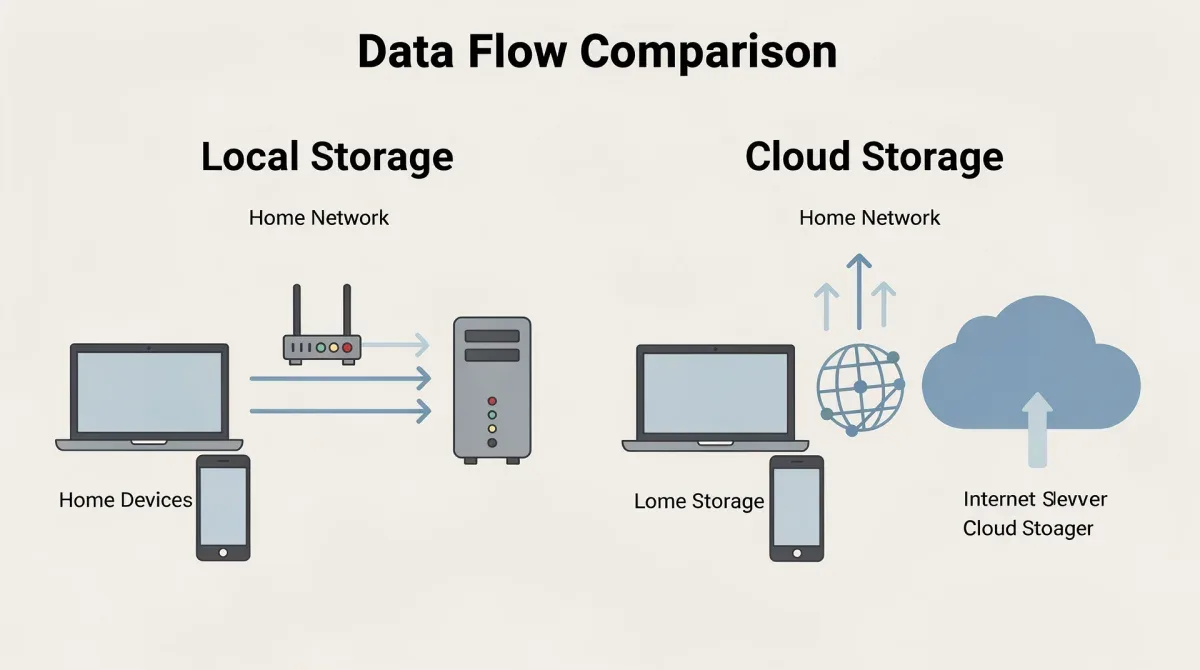
In conclusion, the comparison reveals a clear trade-off: local storage excels in privacy, long-term cost savings, and operational reliability, while cloud subscriptions offer unmatched convenience and advanced AI features at a recurring cost and with inherent privacy considerations. Your ideal choice will depend on your priorities and tolerance for these factors.
Setting Up a 4K Local Storage System
Implementing a 4K local storage security camera system might seem more complex than simply subscribing to a cloud service, but with the right guidance, it's a straightforward process that offers significant long-term benefits. This section will walk you through the essential steps and considerations for a successful setup.
Choosing the Right Hardware
The foundation of your local storage system begins with selecting appropriate hardware. For 4K cameras, this means:
- High-Capacity Storage: Opt for microSD cards with ample space (e.g., 128GB or 256GB) for individual cameras, or an NVR/NAS with several terabytes of storage for multiple cameras and longer retention periods. Consider surveillance-grade hard drives for NVRs, as they are designed for continuous writing.
- Compatible Cameras: Ensure your chosen 4K cameras explicitly support local storage options, whether it's an SD card slot or ONVIF compatibility for NVR integration.
- Network Infrastructure: A robust home network is crucial. Consider upgrading to a Wi-Fi 6 router or using Ethernet connections for wired cameras to handle the high bandwidth demands of 4K streaming.
Careful selection of components ensures seamless operation and prevents bottlenecks in your surveillance system.
Installation and Configuration Best Practices
Once you have your hardware, the installation process involves several key steps. For cameras with microSD cards, simply insert the card and configure the recording settings through the camera's app. Ensure continuous recording or motion-activated recording is enabled, depending on your preference.
For NVR/NAS systems, the setup is more involved but offers greater control. Connect your cameras to the NVR, either directly via Ethernet (PoE NVRs) or wirelessly through your network. Configure recording schedules, motion detection zones, and storage overwrite policies. It's also wise to set up remote access to your NVR via a secure VPN or port forwarding (with caution) if you need to view footage away from home without relying on cloud services.
Regularly check storage capacity and ensure that older footage is being overwritten as intended, or that you have sufficient storage for your desired retention period. Periodically review your camera feeds and system settings to confirm everything is operating correctly.
In conclusion, setting up a 4K local storage system requires careful hardware selection and thoughtful configuration. However, the initial effort pays off with enhanced privacy, cost savings, and a robust, independent surveillance solution.
Maximizing Privacy and Security with Local Storage
One of the most compelling reasons to choose 4K local storage for your smart home security cameras is the enhanced privacy and security it offers. By keeping your data on-premises, you maintain greater control over who can access your sensitive footage. This section delves into strategies for maximizing these benefits and ensuring your local storage system is truly secure.
Securing Your Local Network
The effectiveness of local storage hinges on the security of your home network. If your network is compromised, your locally stored footage could still be vulnerable. Implement these best practices:
- Strong Wi-Fi Password: Use a complex, unique password for your Wi-Fi network.
- Guest Network: Isolate smart devices on a separate guest network to prevent them from accessing your main network resources.
- Firewall: Ensure your router's firewall is enabled and properly configured.
- Regular Updates: Keep your router's firmware and camera software updated to patch known vulnerabilities.
- Disable UPnP: Universal Plug and Play (UPnP) can create security risks by automatically opening ports. Disable it if not absolutely necessary.
A fortified network creates a robust perimeter around your locally stored data, significantly reducing external threats.
Physical Security of Storage Devices
While digital security is vital, the physical security of your storage devices (SD cards, NVRs, NAS drives) is equally important. If an intruder gains physical access to these devices, your footage could be compromised. Consider these measures:
- Discreet Placement: Locate NVRs or NAS devices in a secure, hidden, or locked area within your home, away from easy access points.
- Backup Strategy: For critical footage, consider a secondary backup to an external hard drive stored off-site, or an encrypted cloud service specifically for backups, creating a hybrid approach.
- Encryption: If your NVR or NAS supports drive encryption, enable it to protect data even if the physical device is stolen.
Combining strong network security with physical protection for your storage devices creates a multi-layered defense, ensuring your 4K surveillance footage remains private and secure.
In conclusion, maximizing privacy and security with local storage involves a holistic approach, encompassing both robust network protection and the physical safeguarding of your storage hardware. By taking these steps, you can fully leverage the privacy advantages inherent in local surveillance systems.
Future Trends in Home Security Storage
The landscape of smart home security is constantly evolving, with new technologies and approaches emerging to address the challenges of data storage, privacy, and accessibility. Understanding these future trends can help consumers make forward-looking decisions about their security camera systems, ensuring longevity and adaptability.
Edge AI and On-Device Processing
One significant trend is the increasing integration of Artificial Intelligence (AI) directly onto the camera itself, often referred to as 'edge AI'. Instead of sending all footage to the cloud for analysis, cameras are becoming smarter, capable of performing tasks like person detection, facial recognition, and even anomaly detection locally. This reduces bandwidth requirements and enhances privacy, as sensitive processing happens on-device rather than on remote servers.
Edge AI can significantly improve the efficiency of local storage systems by only recording and storing relevant events, rather than continuous, uneventful footage. This extends the effective storage capacity and makes reviewing footage much faster and more targeted. It also paves the way for more sophisticated, personalized security responses without relying on constant cloud connectivity.
Hybrid Storage Solutions
The future isn't necessarily a strict either/or between local and cloud storage; rather, it's moving towards intelligent hybrid models. These systems combine the best of both worlds:
- Primary Local Storage: Most footage is stored locally for privacy and cost-effectiveness.
- Cloud Backup for Critical Events: Only short clips of critical events (e.g., motion detection of a person) are uploaded to a secure, encrypted cloud for off-site backup.
- Remote Access to Event Logs: Users can remotely access a log of events and, if needed, pull specific footage from the local storage via a secure connection.
This approach offers the privacy and cost benefits of local storage while retaining the convenience and off-site redundancy of the cloud for crucial moments. It allows users to tailor their storage strategy to their specific needs, balancing security, privacy, and accessibility.
Another emerging trend is the development of more robust and user-friendly home server solutions that can act as a central hub for all smart home data, including security footage. These solutions empower users with even greater control and customization options, moving away from proprietary systems towards more open and interoperable platforms.
In conclusion, future trends in home security storage point towards smarter, more efficient, and more user-centric solutions. Edge AI and hybrid storage models are set to redefine how we store and manage our 4K surveillance footage, offering a promising outlook for enhanced security and privacy.
| Key Aspect | Description |
|---|---|
| 4K Resolution | Offers superior image detail for identification, but demands significant storage capacity. |
| Local Storage | Footage stored on-site (SD card, NVR), ensuring privacy, no recurring fees, and internet independence. |
| Cloud Subscriptions | Convenient remote access and off-site backup, but involves recurring costs and privacy considerations. |
| Hybrid Solutions | Combines local storage for primary recording with cloud for critical event backup and remote access. |
Frequently Asked Questions About 4K Security Cameras and Storage
What are the main advantages of 4K resolution in security cameras?▼4K resolution provides significantly clearer and more detailed images than 1080p, allowing for better identification of faces, license plates, and small objects. This enhanced clarity can be crucial for evidence collection and overall surveillance effectiveness, making your security system more robust.
Is local storage truly more private than cloud storage for security footage?▼Yes, local storage is generally considered more private because your video data remains within your home network and is not transmitted to third-party servers. This significantly reduces the risk of external data breaches and gives you complete control and ownership over your personal recordings, enhancing peace of mind.
How much storage capacity do I need for 4K local recording?▼The storage needed for 4K recording depends on the number of cameras, recording quality, and desired retention period. For continuous recording, a single 4K camera can fill a 128GB SD card in a few days. NVRs with several terabytes are recommended for multiple cameras or extended recording durations.
Can I access my locally stored footage remotely without a cloud subscription?▼Yes, many local storage systems (especially NVRs/NAS) allow remote access via secure methods like a Virtual Private Network (VPN) or carefully configured port forwarding on your router. This lets you view live feeds or recorded footage from anywhere, maintaining data privacy without relying on cloud services.
What are the potential drawbacks of relying solely on local storage?▼While private and cost-effective, local storage can have drawbacks. If the local storage device is stolen or physically damaged, your footage could be lost. It also requires an initial investment in hardware and may lack advanced AI features often bundled with cloud subscriptions, unless the camera supports edge AI.
Conclusion
Navigating the world of smart home security cameras, particularly with the advent of 4K resolution, presents a crucial decision point regarding data storage. This guide has thoroughly explored the advantages of 4K local storage over traditional cloud subscriptions, emphasizing the benefits of enhanced privacy, long-term cost savings, and operational reliability independent of internet connectivity. While cloud services offer undeniable convenience and advanced features, the recurring fees and inherent privacy considerations often make local storage a more compelling and secure choice for discerning homeowners. Ultimately, the best solution will depend on individual priorities regarding cost, data control, and desired feature sets, but understanding the robust capabilities of 4K local storage empowers consumers to make truly informed decisions for their home's security.
