Deploy Private 8B LLMs Locally: Ollama & Open WebUI Guide
This guide provides a detailed walkthrough on deploying private 8B parameter Large Language Models locally using Ollama and Open WebUI, enabling users to leverage powerful AI capabilities while maintaining complete control over their data and privacy.
Welcome to the frontier of personal AI! This comprehensive step-by-step guide to deploying private 8B parameter LLMs locally using Ollama and Open WebUI will empower you to harness the immense potential of large language models right on your own machine. Imagine having the power of advanced AI at your fingertips, without relying on external servers or compromising your data privacy.
Understanding the Landscape: Local LLMs and Their Advantages
The world of artificial intelligence is rapidly evolving, with Large Language Models (LLMs) at the forefront of this transformation. While cloud-based LLMs offer convenience, the increasing demand for data privacy, security, and customized solutions has spotlighted the benefits of local deployment. Running an LLM on your own hardware means your data never leaves your control, a critical factor for individuals and businesses dealing with sensitive information.
Why Local Deployment Matters
Deploying LLMs locally offers a myriad of advantages that extend beyond mere convenience. It's about taking ownership of your AI infrastructure and ensuring that your interactions remain confidential. This approach is particularly appealing for developers, researchers, and privacy-conscious users who want to experiment with AI without the inherent risks associated with third-party services.
- Enhanced Data Privacy: Your data stays on your machine, eliminating concerns about third-party access or data breaches.
- Offline Availability: Operate your LLM even without an internet connection, ideal for remote work or secure environments.
- Cost-Effectiveness: Avoid recurring subscription fees associated with cloud-based LLM APIs, especially for heavy usage.
- Customization and Control: Full control over the model, allowing for fine-tuning and integration with bespoke applications.
Furthermore, local deployment opens doors for innovative applications where real-time, low-latency processing is crucial. Imagine an AI assistant that understands your personal data without ever sending it to the cloud. This is the promise of local LLMs, and with tools like Ollama and Open WebUI, it's more accessible than ever before. This section lays the groundwork for understanding the 'why' behind our journey into local LLM deployment.
Introducing Ollama: Simplifying LLM Management
Ollama has emerged as a game-changer in the local LLM ecosystem, making the process of running and managing large language models remarkably straightforward. It's a lightweight, open-source tool designed to simplify the setup and execution of various LLMs on your personal computer, abstracting away much of the complexity traditionally associated with such deployments.
Key Features of Ollama
At its core, Ollama provides a unified framework for downloading, running, and interacting with LLMs. It handles the intricate details of model quantization, hardware acceleration, and API exposure, allowing users to focus on leveraging the models rather than wrestling with technical configurations. Its command-line interface is intuitive, making it easy to pull models from a public library or even run custom ones.
- Easy Model Download: Access a curated library of popular LLMs with a single command.
- Optimized Performance: Leverages hardware acceleration (GPU where available) for efficient inference.
- REST API Exposure: Provides a simple API for programmatic interaction with deployed models.
- Cross-Platform Compatibility: Available for macOS, Linux, and Windows, ensuring broad accessibility.
Ollama effectively democratizes access to powerful LLMs, enabling users with varying levels of technical expertise to deploy and experiment with these models locally. Its streamlined approach reduces the barrier to entry, making it an ideal foundation for our private LLM setup. This is where our journey truly begins, by installing and configuring this essential component.
Setting Up Your Environment: Installation of Ollama
Before we can dive into deploying an 8B parameter LLM, the first critical step is to install Ollama on your system. The installation process is designed to be user-friendly, catering to different operating systems. Ensuring a smooth installation is paramount for the subsequent steps, as Ollama will be the backbone of our local LLM infrastructure.
Installation Steps for Various Operating Systems
Whether you're on Windows, macOS, or Linux, Ollama provides straightforward installation methods. For Windows and macOS users, a direct download and installer typically suffice. Linux users can often rely on a single-line command for installation, making the process quick and efficient. It's crucial to follow the official documentation for the most up-to-date instructions, as software evolves.
Once installed, a quick verification command in your terminal or command prompt can confirm that Ollama is ready to go. This usually involves running `ollama --version` or `ollama list` to see if the client responds correctly. Any errors at this stage should be addressed before proceeding, as they could indicate a problem with the core installation. A successful installation means you're now equipped with the primary tool to manage your local LLMs.
Downloading Your First 8B Parameter LLM
With Ollama successfully installed, the next exciting step is to download an 8B parameter LLM. Ollama's model library includes several excellent options, such as Llama 2 7B or Mistral 7B, which are often referred to as 8B class models due to their effective parameter count and capabilities. These models strike a good balance between performance and local resource requirements.
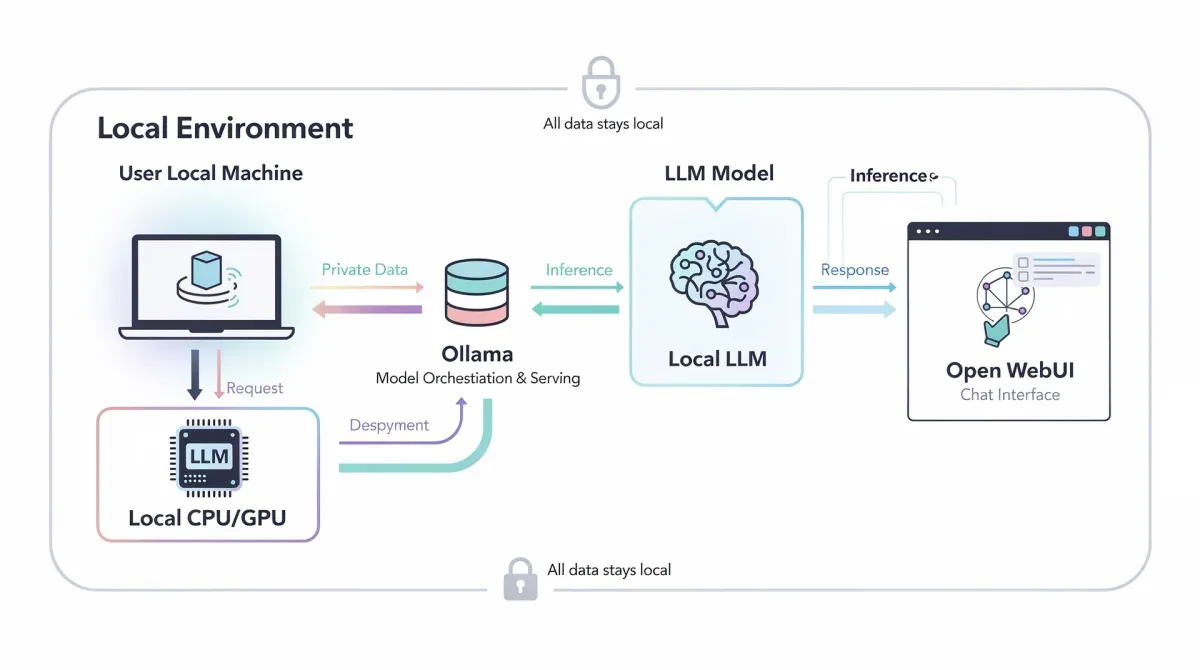
To download a model, you simply use the `ollama pull` command followed by the model name. For example, `ollama pull llama2:7b` would initiate the download of the Llama 2 7B model. Depending on your internet speed and the model size (typically several gigabytes), this process might take some time. Once downloaded, the model is stored locally and managed by Ollama, ready for immediate use. This step is fundamental to having an LLM to interact with privately.
Introducing Open WebUI: Your Local LLM Interface
While Ollama provides the backend for running LLMs, Open WebUI offers a user-friendly, web-based interface to interact with them. It transforms the command-line experience into an intuitive chat application, similar to popular AI platforms, but entirely local and private. Open WebUI is a powerful front-end that connects directly to your Ollama instance, allowing you to converse with your deployed LLMs effortlessly.
The Power of a Graphical Interface
Interacting with LLMs through a graphical interface significantly enhances usability and accessibility. Open WebUI provides a clean, modern chat interface where you can send prompts, receive responses, and manage your conversations. This makes experimenting with different prompts, evaluating model responses, and integrating LLMs into your workflow much more efficient and enjoyable than command-line interactions alone.
- Intuitive Chat Interface: Engage with your LLM through a familiar chat window.
- Conversation History: Maintain a record of your interactions for easy reference and continuity.
- Multiple Model Support: Seamlessly switch between different LLMs hosted by Ollama.
- Customization Options: Personalize the interface and manage various settings for an optimal user experience.
Open WebUI bridges the gap between the technical backend of Ollama and the practical needs of end-users. It ensures that deploying private LLMs locally isn't just for developers, but for anyone who wants to leverage AI in a secure and controlled environment. The combination of Ollama and Open WebUI creates a robust and user-friendly private AI ecosystem on your personal machine.
Deploying Open WebUI and Connecting to Ollama
The deployment of Open WebUI typically involves using Docker, a widely adopted platform for developing, shipping, and running applications in containers. Docker simplifies the process by packaging Open WebUI and its dependencies into a single, portable unit, ensuring it runs consistently across different environments. This approach streamlines the setup and minimizes compatibility issues.
Docker Installation and Open WebUI Deployment
First, ensure Docker is installed and running on your system. Once Docker is ready, deploying Open WebUI is usually a matter of running a few commands in your terminal. These commands pull the Open WebUI Docker image, configure it to connect to your local Ollama instance, and start the container. The beauty of Docker is that it handles all the underlying dependencies, making the process remarkably smooth.
After the Docker container starts, Open WebUI will be accessible via your web browser, typically at a local address like `http://localhost:8080`. Upon first access, you might need to perform a quick setup, such as creating an administrative user. The interface will then allow you to select the LLM you downloaded with Ollama, establishing the connection between your front-end and backend AI components. This seamless integration is what makes the Ollama and Open WebUI pairing so powerful for local LLM deployment.

Testing Your Local LLM Setup
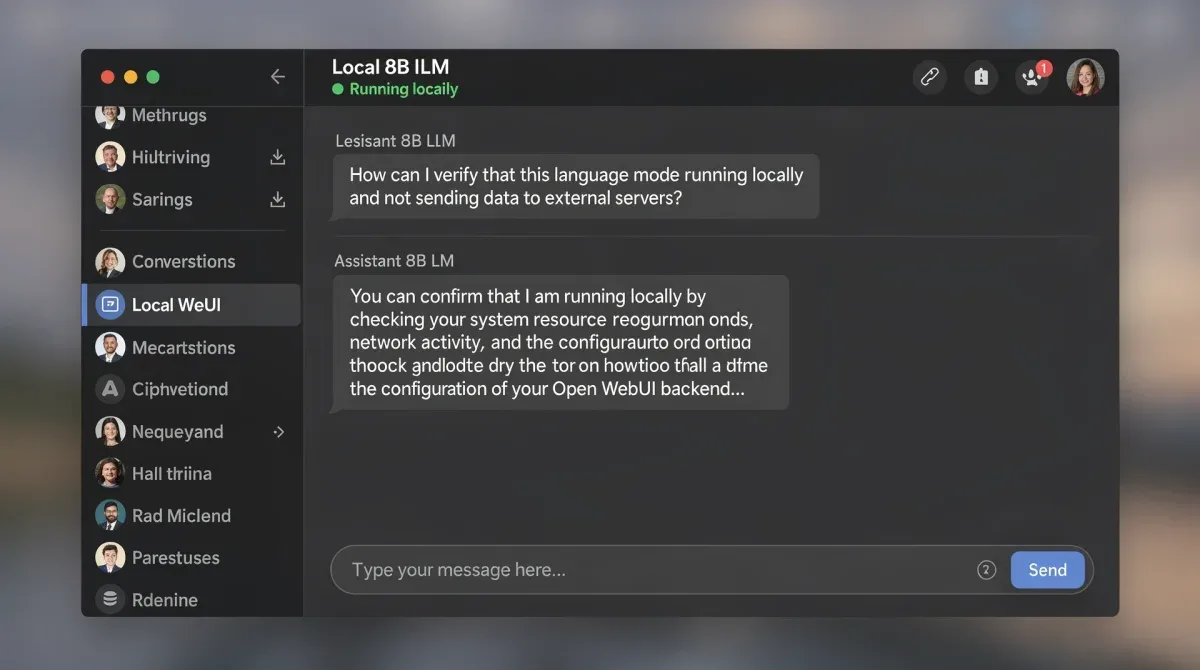
Once Open WebUI is up and running and connected to Ollama, it's time to test your private LLM deployment. Navigate to the chat interface in Open WebUI, select your 8B parameter LLM (e.g., Llama 2 7B), and start a conversation. Ask it a question, give it a prompt, or challenge it with a complex task. Observe its responses and evaluate its performance. This hands-on interaction confirms that your entire setup is functioning correctly.
Testing is not just about verifying functionality; it's also about understanding the capabilities and limitations of your chosen 8B parameter LLM. Different models excel at different tasks, and local deployment allows for extensive experimentation without incurring external costs or privacy concerns. This iterative process of testing and refinement is key to maximizing the value of your private AI assistant.
Optimizing Performance and Troubleshooting Common Issues
Even with a smooth initial deployment, optimizing performance and knowing how to troubleshoot common issues are crucial for a robust local LLM experience. An 8B parameter LLM can be resource-intensive, so understanding how to get the most out of your hardware is essential. This section focuses on practical tips to enhance your setup and resolve any hiccups you might encounter.
Performance Optimization Tips
To ensure your local LLM runs as efficiently as possible, consider several optimization strategies. Utilizing a dedicated GPU, if available, can dramatically speed up inference times. Ensure your GPU drivers are up-to-date, as this can significantly impact performance. Additionally, allocating sufficient RAM to your system is vital, especially for larger models. Monitoring your system's resource usage (CPU, GPU, RAM) while the LLM is running can help identify bottlenecks.
- GPU Acceleration: Prioritize systems with NVIDIA or AMD GPUs for faster inference.
- RAM Allocation: Ensure at least 16GB of RAM, with 32GB or more being ideal for smoother operation.
- Model Quantization: Experiment with different quantization levels (e.g., 4-bit, 8-bit) if available, to balance performance and resource usage.
- Background Processes: Minimize other resource-intensive applications running in the background.
Regularly updating Ollama and Open WebUI to their latest versions can also bring performance improvements and bug fixes. The open-source communities behind these tools are constantly working on enhancements, so staying current is beneficial for maintaining an optimized environment. These proactive measures contribute significantly to a seamless and responsive local LLM experience.
Troubleshooting Common Deployment Issues
Despite careful planning, you might encounter issues during deployment or operation. Common problems include models failing to load, connection errors between Ollama and Open WebUI, or slow inference speeds. For model loading issues, verify that the model file is complete and not corrupted. Re-downloading the model can often resolve this.
Connection problems between Ollama and Open WebUI often stem from incorrect network configurations or firewall settings. Ensure that both applications can communicate on the specified ports (e.g., Ollama on 11434, Open WebUI on 8080). Checking Docker logs for Open WebUI and Ollama's server output can provide valuable diagnostic information. For slow performance, revisit the optimization tips, particularly regarding GPU drivers and RAM. The community forums and documentation for both Ollama and Open WebUI are excellent resources for finding solutions to more specific problems. Persistence and systematic debugging will help overcome most challenges, ensuring your private LLM setup remains functional and efficient.
| Key Component | Brief Description |
|---|---|
| Ollama | Manages LLM downloads, local execution, and API exposure on your machine. |
| Open WebUI | Provides a user-friendly, web-based chat interface to interact with Ollama-hosted LLMs. |
| 8B Parameter LLM | Large Language Model (e.g., Llama 2 7B, Mistral 7B) running entirely on your local hardware. |
| Docker | Containerization platform used to easily deploy Open WebUI consistently. |
Frequently asked questions about local LLM deployment
What are the minimum system requirements for deploying an 8B parameter LLM locally?▼For an 8B parameter LLM, a system with at least 16GB of RAM is generally recommended, with 32GB being ideal for better performance. A modern CPU is sufficient, but a dedicated GPU (NVIDIA or AMD) with at least 8GB VRAM will significantly accelerate inference speeds, making interactions much faster and smoother.
Can I use Ollama and Open WebUI with LLMs larger than 8B parameters?▼Yes, Ollama and Open WebUI support various LLM sizes, including those larger than 8B parameters, provided your hardware can handle them. The primary limiting factor will be your system's RAM and GPU VRAM. Larger models require more resources, so always check the model's specific requirements before attempting to deploy it locally.
Is my data truly private when using Ollama and Open WebUI locally?▼Yes, when deployed correctly, your data remains entirely on your local machine. Ollama and Open WebUI process information within your private environment, without sending any of your prompts or responses to external servers. This is the core advantage of local deployment, ensuring maximum data privacy and security for your AI interactions.
How often should I update Ollama and Open WebUI?▼It is generally recommended to keep both Ollama and Open WebUI updated regularly. Updates often include performance enhancements, bug fixes, security patches, and support for new models. Checking for updates monthly or whenever a significant new release is announced will help maintain an optimized and secure local LLM environment.
What if I don't have a powerful GPU for local LLM deployment?▼While a powerful GPU significantly improves performance, you can still deploy 8B parameter LLMs using your CPU. However, expect slower inference times, which might impact the responsiveness of your AI interactions. For CPU-only setups, ensuring ample RAM is even more critical to manage the model effectively and prevent system slowdowns.
Conclusion
Deploying private 8B parameter LLMs locally using Ollama and Open WebUI represents a significant leap towards accessible and secure artificial intelligence. This guide has walked you through each essential step, from understanding the foundational benefits of local deployment to the practicalities of installation, model management, and interface interaction. By taking control of your AI infrastructure, you not only unlock powerful analytical and creative capabilities but also safeguard your data privacy in an increasingly interconnected world. The journey into local LLMs is a rewarding one, offering unparalleled control and flexibility for personal and professional endeavors. Embrace this technology to reshape how you interact with AI, ensuring your innovations remain both powerful and private.
