Descript's New Engine: 50% Faster Video Editing Workflows
Descript's new automated transcript cut engine significantly accelerates video editing workflows by enabling users to edit video by simply editing text, promising up to a 50% reduction in post-production time for creators.
In the fast-paced world of digital content creation, efficiency is paramount. To truly speed up video editing workflows by 50% using Descript's latest automated transcript cut engine, content creators are now finding a powerful ally that redefines the post-production process, making it more intuitive and significantly faster than ever before.
The revolution of text-based video editing
The traditional video editing paradigm, characterized by meticulous timeline manipulation and frame-by-frame adjustments, has long been a bottleneck for creators. Descript's innovative approach, however, flips this on its head by treating video as a document. This fundamental shift allows users to edit video content by simply editing its transcribed text, a concept that has been evolving but has now reached a new level of sophistication with their latest engine.
This method not only democratizes video editing, making it accessible to those without extensive technical skills, but also drastically reduces the time spent on mundane tasks. Imagine cutting out awkward pauses, filler words, or irrelevant sections from your video with the same ease as deleting text from a word document. This is the core promise of Descript's automated transcript cut engine, and its implications for productivity are profound.
Understanding the core technology
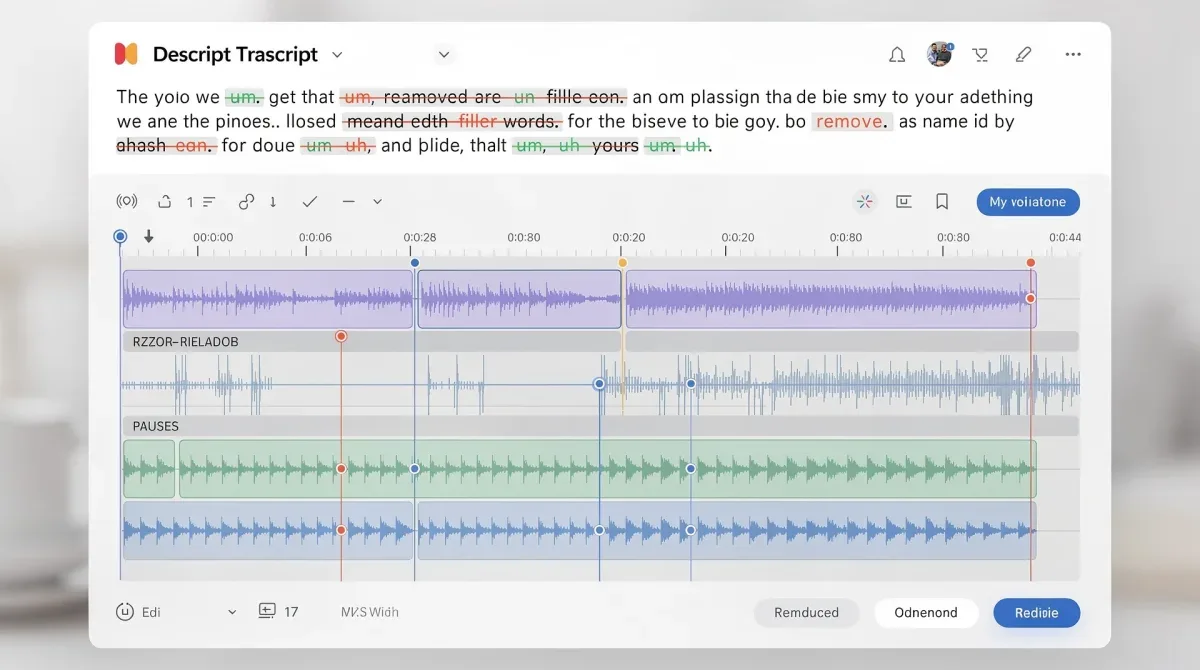
At the heart of Descript's efficiency lies advanced speech-to-text technology combined with intelligent algorithms that identify and segment audio. When you import a video or audio file into Descript, it automatically transcribes the content. This transcript then becomes your primary editing interface. Any changes made to the text are directly reflected in the corresponding video or audio track.
- Accurate Transcription: The engine boasts high accuracy in converting spoken words into text, forming the reliable foundation for text-based editing.
- Intelligent Silence Detection: It automatically identifies and flags silences or pauses, giving editors the option to remove them with a single click.
- Filler Word Removal: Common filler words like 'um,' 'uh,' 'like,' and 'you know' are highlighted, allowing for quick, bulk deletion.
- Non-Destructive Editing: All edits are non-destructive, meaning the original media remains untouched, and changes can be reverted at any time.
This innovative blend of transcription and editing tools means that the tedious process of scrubbing through timelines to find specific moments or errors is largely eliminated. Editors can read through the transcript, identify areas for improvement, and implement changes instantly, significantly streamlining the initial cut process.
How the automated transcript cut engine works its magic
The latest iteration of Descript's automated transcript cut engine builds upon its already impressive capabilities, introducing enhanced precision and speed. This engine is designed to intelligently interpret textual edits and translate them into seamless video cuts, creating a polished final product with minimal manual intervention. It's not just about deleting text; it's about understanding the context and rhythm of speech.

When you remove a sentence from the transcript, the engine automatically cuts that corresponding segment from the video. If you rearrange paragraphs, the video segments are reordered accordingly. This level of automation is what truly differentiates Descript from traditional editing software, making it a game-changer for anyone dealing with spoken content.
Key features enhancing workflow speed
Several features within the new engine contribute to its remarkable speed improvements. These are designed to tackle the most time-consuming aspects of video editing, particularly for content heavily reliant on dialogue, such as podcasts, interviews, tutorials, and vlogs.
- Overdub: This unique feature allows users to correct audio mistakes by typing new words. Descript's AI then generates a synthetic voice that matches the speaker's original voice, seamlessly inserting the corrected audio without re-recording.
- Studio Sound: With a single click, Studio Sound can transform raw, noisy audio into studio-quality sound, eliminating background noise and enhancing voice clarity. This saves hours of audio cleanup.
- Multi-track Editing: While focused on text, Descript also handles multi-track audio and video, allowing for complex productions to be managed within the same intuitive interface.
- Collaboration Tools: Teams can work together on projects in real-time, with comments and edits visible to all collaborators, further reducing revision cycles.
These features, combined with the core text-based editing, create an ecosystem where the entire post-production process, from initial rough cut to final polish, is dramatically accelerated. The ability to quickly iterate and experiment with different versions without lengthy rendering times is invaluable for creative exploration.
Real-world impact: achieving 50% faster workflows
The claim of speeding up video editing workflows by 50% might seem ambitious, but for many users, it's a conservative estimate. Consider the typical workflow for a talking-head video or a podcast with video. The initial steps involve transcribing the audio, identifying errors, cutting out unwanted sections, and then refining the timing. In traditional software, each of these steps requires significant manual effort and time.
With Descript, the transcription is automatic. Identifying errors or filler words is as simple as scanning the text. Removing sections is a matter of highlighting and deleting. This front-loaded efficiency translates into massive time savings. For instance, a one-hour interview that might take 8-10 hours to edit traditionally could be cut down to 4-5 hours or even less with Descript.
Case studies and testimonials
Numerous content creators, from independent podcasters to large media organizations, have reported significant improvements in their production schedules. For example, a marketing agency producing weekly video updates found that their editing team could now handle twice the volume of content without increasing headcount, directly attributing this to Descript's efficiency.
A documentary filmmaker used Descript to quickly assemble rough cuts from hours of interview footage, allowing them to focus on storytelling rather than technical editing. The ability to rapidly experiment with different narrative structures by simply rearranging text provided an unprecedented level of creative freedom and speed.
These real-world applications underscore the transformative power of the automated transcript cut engine. It's not just about doing things faster; it's about enabling creators to produce more, experiment more, and ultimately, deliver higher quality content more consistently.
Integrating Descript into existing production pipelines
While Descript offers a comprehensive suite of editing tools, it also understands that many creators have established workflows with other software. The platform is designed to integrate seamlessly into existing production pipelines, allowing users to leverage its strengths without completely overhauling their entire setup. This flexibility is crucial for wider adoption and maximum impact.
For instance, an editor might use Descript for the initial rough cut, cleaning up dialogue and structuring the narrative using the transcript. Once this foundation is laid, the project can be exported to more traditional NLEs (Non-Linear Editors) like Adobe Premiere Pro or DaVinci Resolve for advanced color grading, motion graphics, and complex visual effects. Descript supports various export formats, ensuring compatibility.
Best practices for optimal integration
- Pre-edit in Descript: Perform all dialogue-centric edits, filler word removal, and basic structuring within Descript to capitalize on its text-based efficiency.
- Export Clean Files: Export a clean, edited audio and video track from Descript. This provides a solid foundation for further post-production in other software.
- Utilize Collaboration: Use Descript's collaboration features for script approvals and initial feedback rounds, streamlining communication with clients or team members.
- Leverage Overdub for Minor Corrections: For small audio fixes, use Overdub to avoid re-recording sessions, saving significant time and resources.
By strategically integrating Descript into specific stages of the production process, creators can maximize its benefits without disrupting their established routines. This hybrid approach allows for the best of both worlds: Descript's speed and efficiency for dialogue editing, combined with the advanced capabilities of specialized software for visual polish.
Beyond efficiency: creative freedom and accessibility
The benefits of Descript's automated transcript cut engine extend far beyond mere efficiency. By simplifying the technical aspects of editing, it empowers creators to focus more on storytelling and creative expression. When you're not bogged down by tedious manual adjustments, your mind is free to explore narrative possibilities, experiment with pacing, and refine your message.
This enhanced creative freedom is particularly valuable for independent creators and small teams who often wear multiple hats. With less time spent on editing, they can dedicate more resources to pre-production, scriptwriting, or marketing, ultimately leading to a higher quality and more impactful final product. The barrier to entry for video creation is also significantly lowered, making professional-grade editing accessible to a broader audience.
Empowering diverse creators
The text-based interface makes video editing more intuitive for individuals who are comfortable with word processors but intimidated by complex video timelines. This includes journalists, educators, marketers, and business professionals who need to produce video content but lack specialized editing skills. Descript transforms video editing from a technical craft into a more linguistic process.
Furthermore, the accessibility features, such as automatic transcription and the ability to easily generate captions, are invaluable for creating inclusive content. This ensures that videos are accessible to audiences with hearing impairments and also improves SEO by providing searchable text content for videos.
Ultimately, Descript is not just a tool for speeding up workflows; it's a platform that fosters creativity, democratizes video production, and makes content creation more accessible and inclusive for everyone.
The future of video editing with AI and automation
Descript's automated transcript cut engine is a strong indicator of where video editing technology is headed. The integration of artificial intelligence and advanced automation is set to redefine how we create and consume media. As AI models become more sophisticated, we can expect even greater levels of intelligence in editing software, anticipating creative needs and automating more complex tasks.
Imagine AI that can suggest optimal cuts based on emotional cues in the dialogue, automatically color-correct footage based on scene analysis, or even generate initial drafts of motion graphics. While these capabilities are still evolving, Descript's current engine provides a compelling glimpse into this future, where the line between human creativity and machine assistance blurs.
Anticipating further advancements
The continuous development in speech recognition, natural language processing, and generative AI will undoubtedly lead to even more powerful editing tools. Future iterations of Descript's engine, or similar technologies, might offer:
- Contextual Editing: AI understanding the narrative context to suggest cuts that enhance storytelling, not just remove errors.
- Automated B-roll Integration: AI suggesting or even automatically inserting relevant B-roll footage based on the spoken narrative.
- Personalized Editing Styles: The ability for AI to learn an editor's preferred style and apply it across projects, maintaining consistency.
- Real-time Editing Suggestions: AI providing real-time feedback and suggestions during the editing process, acting as a co-editor.
These advancements promise to further reduce the time and effort required for video production, allowing creators to focus on the truly unique and human elements of their work. Descript is at the forefront of this revolution, continually pushing the boundaries of what's possible in digital content creation.
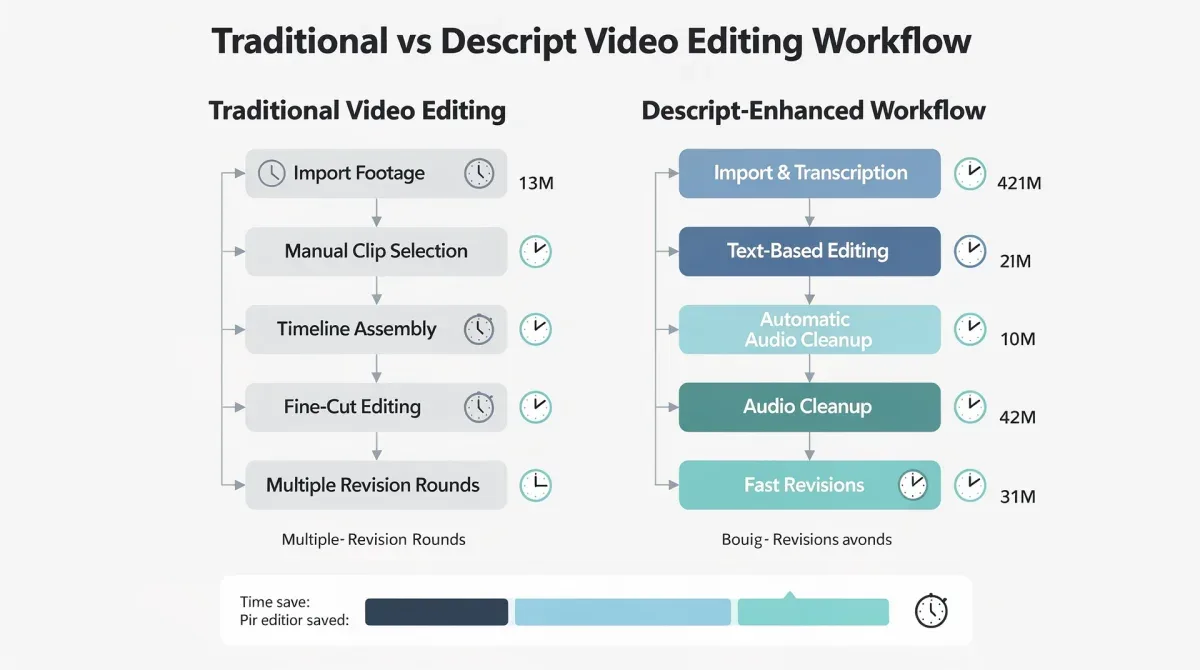
| Key Feature | Benefit to Workflow |
|---|---|
| Automated Transcription | Instantly converts spoken audio to text, eliminating manual transcription time. |
| Text-Based Editing | Edit video by manipulating text, drastically speeding up rough cuts and revisions. |
| Filler Word Removal | Quickly identify and remove 'um,' 'uh,' and other common fillers with a click. |
| Overdub & Studio Sound | Correct audio mistakes with AI voice generation and enhance sound quality instantly. |
Frequently asked questions
What is Descript's automated transcript cut engine?▼Descript's automated transcript cut engine is an advanced feature that allows users to edit video and audio by simply editing the automatically generated text transcript. It intelligently translates textual changes into precise video cuts, streamlining the entire post-production process.
How much faster can video editing workflows become with Descript?▼Many users report speeding up their video editing workflows by 50% or more. This significant time reduction comes from automating tasks like transcription, filler word removal, and general rough cutting, allowing creators to focus on more creative aspects.
Is Descript suitable for professional video editors?▼Yes, Descript is increasingly adopted by professionals. While it excels at dialogue-heavy content and initial cuts, its robust features and export capabilities allow it to integrate seamlessly into professional workflows, often complementing traditional NLEs for specialized tasks.
Can Descript replace traditional video editing software entirely?▼Descript is powerful for many tasks, especially those involving spoken word. However, for highly complex visual effects, advanced color grading, or intricate motion graphics, traditional software like Adobe Premiere Pro or DaVinci Resolve might still be preferred. Descript often serves as an excellent pre-editor.
What are the main benefits of text-based video editing?▼The main benefits include increased speed, enhanced accessibility for non-editors, easier collaboration, and greater creative freedom. By simplifying the technical aspects of editing, it allows creators to focus on storytelling and producing more content efficiently.
Conclusion
Descript's latest automated transcript cut engine represents a pivotal advancement in video editing technology, offering a genuinely transformative approach to post-production. By enabling creators to edit video with the simplicity of a word processor, it not only promises to speed up workflows by a remarkable 50% but also democratizes access to professional-grade editing tools. This innovation frees up invaluable time for creative exploration, allowing content producers to focus on crafting compelling narratives rather than battling cumbersome timelines. As the digital landscape continues to evolve, tools like Descript will be indispensable for staying competitive and efficient, paving the way for a future where high-quality video content is more accessible and faster to produce than ever before.
