SaaS Overspending: Audit and Eliminate Redundant Project Tools
Many businesses unknowingly overspend on redundant SaaS subscriptions. This guide provides a comprehensive framework to audit and eliminate unnecessary project management tools, ensuring cost efficiency and streamlined operations, helping you avoid paying too much for SaaS.
Are you seeing multiple invoices for similar software, wondering if you're truly getting value from every subscription? The question, Are You Paying Too Much for SaaS? How to Audit and Eliminate 3 Redundant Project Management Tools, is more relevant than ever in today's digital-first business landscape. Unchecked SaaS sprawl can silently erode budgets and complicate workflows, making a strategic audit not just beneficial, but essential.
The Silent Drain: Understanding SaaS Sprawl
In the rapid adoption of cloud-based solutions, many organizations find themselves accumulating an array of Software as a Service (SaaS) tools. While each tool promises efficiency and innovation, the sheer volume can lead to a phenomenon known as SaaS sprawl. This isn't just about having many tools; it's about having too many tools that perform similar functions, creating redundancy and unnecessary expenses.
SaaS sprawl often starts innocently. A team needs a specific feature, finds a tool, and subscribes. Another team, facing a similar but slightly different challenge, finds another tool. Before long, a company could be paying for three different project management platforms, each with overlapping capabilities, simply because there wasn't a centralized strategy or oversight. This fragmented approach not only inflates operational costs but also introduces complexities in data management, security, and employee training. Understanding the root causes of this sprawl is the first step towards regaining control and optimizing your digital toolkit.
The hidden costs of unmanaged subscriptions
- Direct financial waste: Paying for licenses that are underutilized or for features that are never used.
- Increased administrative burden: Managing multiple vendor relationships, renewals, and billing cycles.
- Security vulnerabilities: Each additional tool represents another potential entry point for data breaches or compliance issues.
- Reduced employee productivity: Teams waste time switching between tools, duplicating efforts, or struggling with inconsistent data across platforms.
The cumulative effect of these hidden costs can be substantial, far outweighing the perceived benefits of individual tools. A thorough understanding of SaaS sprawl reveals that it's not merely a financial problem; it's a strategic challenge impacting efficiency, security, and overall business agility. Addressing it requires a proactive and systematic approach to software management.
Ultimately, recognizing and quantifying the impact of SaaS sprawl is crucial. It’s not enough to simply know you have many tools; you must understand which ones are truly adding value and which are merely contributing to the silent drain on resources. This foundational understanding sets the stage for a comprehensive audit.
Initiating Your SaaS Audit: The First Steps
Embarking on a SaaS audit can seem daunting, but a structured approach simplifies the process. The initial phase focuses on discovery and data collection, laying the groundwork for informed decisions. This involves identifying every piece of software currently in use and understanding its purpose within the organization. Without a clear inventory, it's impossible to discern redundancy or inefficiency. This foundational step is critical for any successful optimization effort.
Many companies are surprised by the sheer number of applications they discover during this phase. Shadow IT, where departments or individuals purchase software without central IT approval, is a common contributor to this sprawl. Therefore, a comprehensive audit must extend beyond officially sanctioned tools to capture the full scope of SaaS usage across the enterprise. This holistic view is essential for a truly effective audit.
Creating a comprehensive software inventory
The first practical step is to create a detailed inventory of all SaaS applications. This isn't just a list of names; it requires gathering specific information for each tool.
- Tool name and vendor: Clearly identify the software and its provider.
- Subscription details: Contract terms, renewal dates, cost, and number of licenses.
- Users and departments: Who uses the tool and which teams rely on it?
- Primary purpose and features: What specific problem does this tool solve? What are its key functionalities?
- Integration points: Does it integrate with other critical business systems?
Collecting this data often involves reviewing expense reports, interviewing department heads, and utilizing specialized SaaS management platforms if available. The more granular the data, the better equipped you'll be to make strategic decisions about each application's fate.
Once the inventory is complete, the next step involves categorizing these tools. Grouping similar applications together, such as all project management tools or all communication platforms, immediately begins to highlight potential areas of overlap. This categorization provides a visual representation of your software ecosystem, making redundancies easier to spot. The clearer the picture you have of your current SaaS landscape, the more effective your subsequent analysis will be.

This initial phase, while labor-intensive, is the most crucial part of determining if you are paying too much for SaaS. It provides the undeniable data needed to justify any changes and ensures that future decisions are based on facts rather than assumptions. Taking the time to do this correctly will save significant resources in the long run.
Identifying Redundant Project Management Tools
With a comprehensive inventory in hand, the next critical phase is to pinpoint where redundancies lie, particularly within project management. This category is often a prime candidate for consolidation, as various teams might adopt different solutions for similar needs, leading to fragmented workflows and inflated costs. The goal here is to identify tools that offer overlapping core functionalities without providing distinct, irreplaceable value.
Effective identification goes beyond simply listing features. It requires a deep dive into how each tool is actually used by different teams and whether those uses could be adequately served by a single, more robust platform or by an existing tool with untapped capabilities. This analytical step is where the true potential for optimization emerges, transforming raw data into actionable insights for cost reduction and efficiency gains.
Analyzing feature overlap and user adoption
Start by comparing the core features of your project management tools. Do you have one tool primarily for task tracking, another for Gantt charts, and a third for team collaboration, when a single platform could handle all three? Look for:
- Task and workflow management: Multiple tools offering similar task assignment, progress tracking, and deadline management.
- Collaboration features: Overlapping communication channels, file sharing, and feedback mechanisms.
- Reporting and analytics: Different tools generating similar project health reports, often with inconsistent data.
Beyond features, analyze user adoption rates. A tool with low user engagement, despite its robust features, might indicate it's not meeting actual team needs or that it's simply redundant. High adoption of multiple, similar tools suggests a lack of standardization and a clear opportunity for consolidation. Understanding the 'why' behind user choices is as important as the 'what' in this analysis.
Consider conducting user surveys or interviews to gather qualitative data on tool effectiveness and user satisfaction. This direct feedback can reveal pain points and preferences that quantitative data alone might miss. For instance, a team might strongly prefer one tool over another due to a specific, mission-critical feature, even if on paper the tools appear similar. This human element is vital for making decisions that support, rather than hinder, productivity.
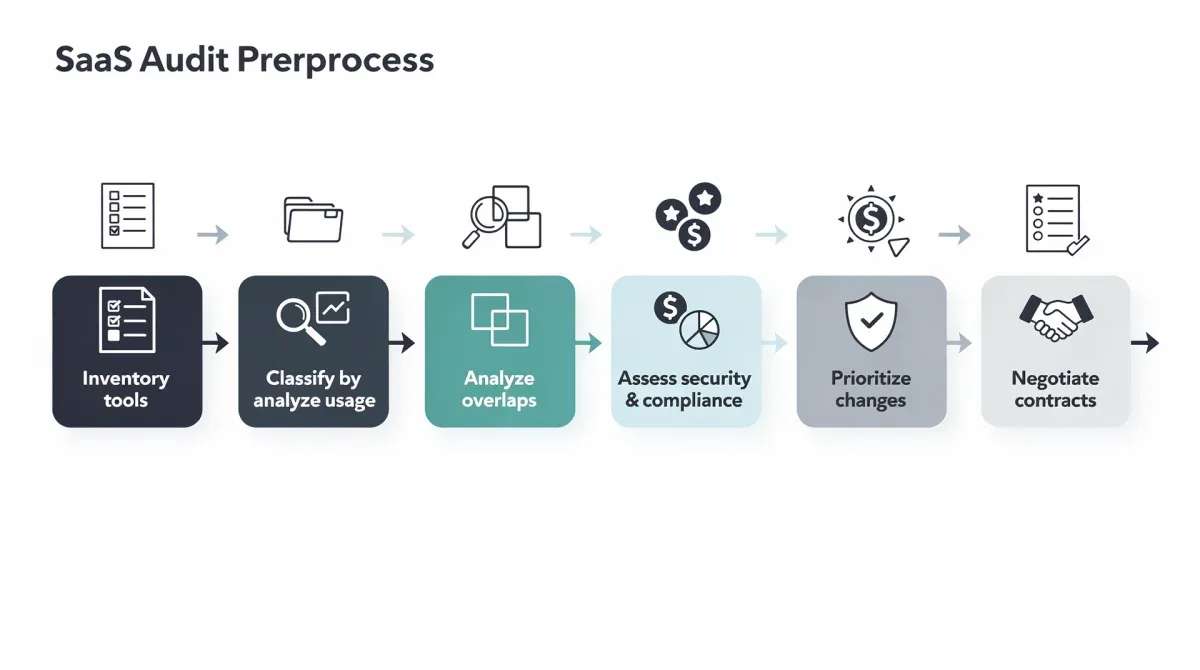
By meticulously comparing features, assessing user adoption, and gathering direct feedback, you can precisely identify which project management tools are truly redundant. This focused analysis allows for targeted elimination, ensuring that critical functionalities are retained while unnecessary expenditures are cut, ultimately streamlining your operational toolkit.
Evaluating Alternatives and Consolidating Tools
Once redundant project management tools are identified, the next strategic step is to evaluate alternatives and plan for consolidation. This isn't simply about canceling subscriptions; it's about thoughtfully selecting a unified solution that meets the diverse needs of your teams while delivering enhanced efficiency and cost savings. The goal is to move from a fragmented ecosystem to a streamlined, integrated one.
This phase requires careful consideration of existing tools that can be expanded to cover more ground, or the selection of a new, comprehensive platform that can replace multiple older ones. It’s an opportunity to not only save money but also to improve workflow consistency, data integrity, and overall team collaboration. The decision should be data-driven and aligned with long-term business objectives.
Choosing the right consolidated solution
When evaluating potential consolidated solutions, consider several key factors:
- Core functionality: Does the chosen tool offer all the essential features currently spread across multiple redundant tools?
- Scalability: Can it grow with your organization and adapt to future needs?
- Integration capabilities: How well does it integrate with other critical SaaS applications (e.g., CRM, ERP, communication platforms)?
- User experience and adoption: Is it intuitive and user-friendly, ensuring high team adoption?
- Cost-effectiveness: Does the consolidated price offer significant savings compared to the sum of individual subscriptions, while still providing superior value?
It's often beneficial to conduct a pilot program with a select group of users for the prospective consolidated tool. This allows for real-world testing and feedback before a full organizational rollout. A successful pilot can highlight unforeseen challenges or confirm the tool's suitability, making the transition smoother and more effective.
Another crucial aspect is data migration. Moving project data from multiple platforms to a single one can be complex. Ensure the chosen solution has robust migration tools or that you have a clear strategy for transferring historical data without loss or corruption. A smooth data transition is paramount for maintaining business continuity and avoiding disruption.
Ultimately, the process of evaluating and consolidating tools is about strategic alignment. It’s about ensuring that every dollar spent on SaaS contributes directly to business goals, eliminating waste, and empowering teams with the best possible digital environment. This thoughtful approach ensures that the transition yields maximum benefits.
The Process of Elimination: Saying Goodbye to Redundancy
Once you've identified redundant tools and selected a consolidated solution, the next step is the actual process of elimination. This phase requires careful planning and execution to ensure a smooth transition without disrupting ongoing projects or losing valuable data. It's not merely about clicking 'cancel subscription'; it involves a strategic wind-down of services and clear communication with affected teams.
A phased approach is often most effective. Rather than an abrupt cut-off, gradually transition teams to the new or consolidated platform. This allows users to adapt, provides time for data migration, and minimizes resistance. Clear communication throughout this process is paramount to maintain team morale and ensure everyone understands the rationale and benefits of the change.
Strategic offboarding and data migration
The elimination process involves several critical steps:
- Data backup and migration: Before canceling any subscription, ensure all relevant data is backed up and successfully migrated to the new consolidated platform. This is non-negotiable to prevent data loss.
- User communication and training: Inform affected users about the upcoming changes, provide timelines, and offer comprehensive training on the new consolidated tool. Address any concerns proactively.
- Contract review and cancellation: Carefully review the terms of service for each redundant tool to understand cancellation policies, notice periods, and potential early termination fees. Plan cancellations to coincide with renewal dates where possible to avoid penalties.
- Access revocation: Once data is migrated and users are transitioned, revoke access to the old tools to prevent shadow usage and maintain security.
Consider creating a detailed checklist for each tool being eliminated. This ensures that no critical step is missed, from data archiving to final invoice reconciliation. Documenting the process also creates a valuable reference for future SaaS audits and consolidations.
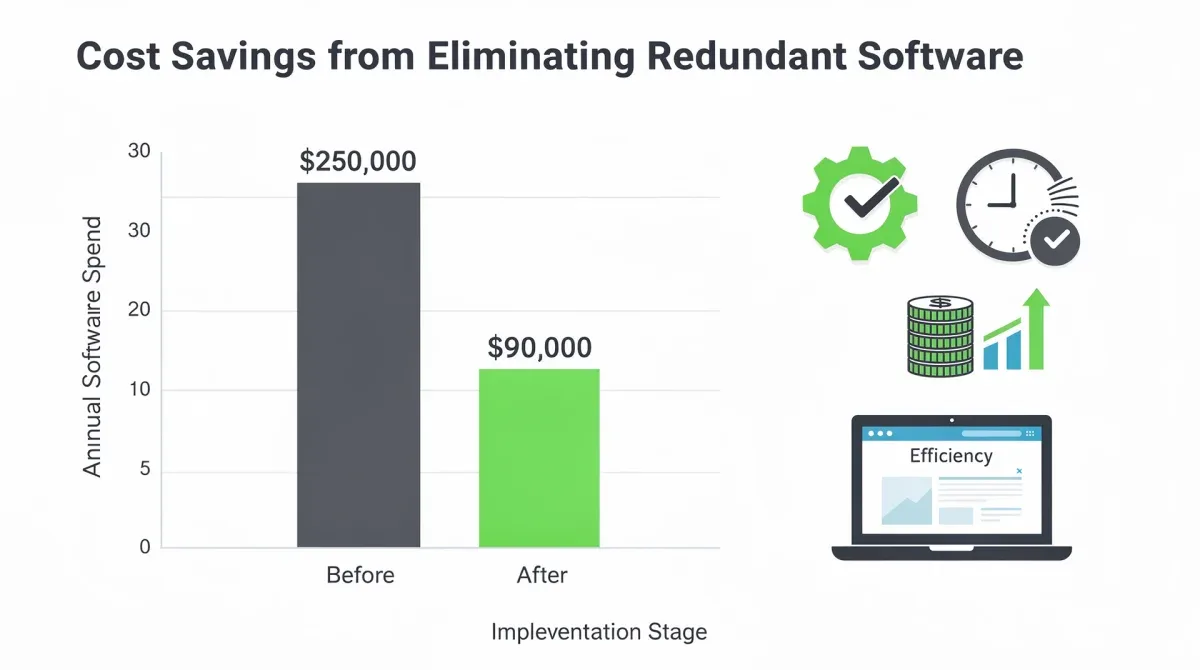
The process of elimination should be viewed as an optimization rather than a deprivation. By removing redundant tools, you're not just saving money; you're simplifying workflows, reducing cognitive load on employees, and creating a more cohesive and efficient digital environment. This strategic offboarding ensures that the benefits of consolidation are fully realized.
Maximizing Efficiency and Cost Savings Post-Audit
Completing a SaaS audit and eliminating redundant tools is a significant achievement, but the work doesn't end there. To truly maximize efficiency and realize long-term cost savings, it’s crucial to implement ongoing strategies for SaaS management. This proactive approach ensures that your organization doesn’t fall back into the cycle of SaaS sprawl and continues to operate with an optimized, cost-effective digital toolkit.
The goal is to establish a culture of continuous review and strategic procurement, where every new software adoption is carefully vetted against existing capabilities and overall business needs. This shift from reactive clean-up to proactive management is what truly drives sustainable efficiency and cost control, solidifying the benefits gained from your initial audit.
Implementing ongoing SaaS management strategies
To maintain an optimized SaaS ecosystem, consider these strategies:
- Centralized SaaS management platform: Invest in a dedicated tool to track all SaaS subscriptions, usage, and spending in real-time. This provides continuous visibility and control.
- Regular review cycles: Schedule quarterly or semi-annual reviews of all SaaS applications to assess their ongoing value, usage, and cost-effectiveness.
- Procurement policies: Establish clear policies for purchasing new software, requiring approval processes that include an assessment of existing tools and potential redundancies.
- User feedback loops: Continuously gather feedback from users on the effectiveness and utility of their tools to identify emerging needs or underperforming applications.
- Vendor relationship management: Maintain open communication with SaaS vendors to negotiate better terms, understand product roadmaps, and leverage bulk discounts.
By integrating these practices into your operational framework, you create a robust system that prevents future SaaS sprawl. This ongoing management transforms software from a potential liability into a strategic asset, ensuring that your organization remains agile, efficient, and cost-aware.
Moreover, the savings realized from eliminating redundant tools can be strategically reinvested into more impactful areas, such as advanced training for employees on consolidated platforms, or exploring innovative technologies that truly differentiate your business. This turns cost-cutting into an opportunity for growth and strategic advantage, demonstrating a clear return on the effort invested in the SaaS audit.
The Strategic Advantage of a Lean SaaS Stack
Adopting a lean SaaS stack—one optimized for efficiency and devoid of redundancy—offers a profound strategic advantage beyond mere cost savings. It transforms an organization's operational landscape, fostering greater agility, enhancing data integrity, and significantly improving overall team productivity. This isn't just about doing more with less; it's about doing the right things with the right tools, strategically aligned with business objectives.
A streamlined software environment reduces complexity, minimizing the cognitive load on employees who no longer need to navigate multiple, overlapping systems. This clarity allows teams to focus their energy on core tasks, innovate more effectively, and collaborate seamlessly, knowing that their tools are integrated and purpose-built for their needs. The benefits ripple through every aspect of the business, from finance to project delivery.
Beyond cost savings: Enhanced productivity and security
- Improved data integrity: Fewer tools mean fewer data silos and less risk of inconsistent or conflicting information. Data flows more smoothly, leading to better decision-making.
- Enhanced security posture: Managing fewer applications reduces the attack surface, simplifying security protocols and minimizing compliance risks. Centralized control over access and data is much easier to achieve.
- Increased team collaboration: A unified project management platform encourages all teams to work within a single ecosystem, fostering better communication and shared understanding of project progress.
- Faster onboarding and training: New employees can get up to speed more quickly when there are fewer, more integrated tools to learn. Training efforts become more focused and effective.
- Greater organizational agility: With a clear overview of their software assets, organizations can adapt more quickly to market changes, adopting new technologies strategically without adding to sprawl.
By embracing a lean SaaS stack, companies are not just managing their expenses; they are investing in their future operational resilience and strategic capabilities. It’s about building a foundation that supports continuous growth and innovation, ensuring that every technological investment serves a clear, value-generating purpose. This strategic pivot ensures that you are no longer paying too much for SaaS, but rather investing wisely in your digital future.
Ultimately, a lean SaaS stack empowers organizations to operate with greater clarity and purpose. It's a testament to effective resource management and a commitment to operational excellence, positioning the business for sustained success in a competitive digital world. The strategic advantages gained far outweigh the initial effort of the audit.
| Key Audit Step | Brief Description |
|---|---|
| Inventory All SaaS | Catalog every software subscription, users, costs, and purpose. |
| Identify Redundancy | Compare features and usage to pinpoint overlapping project management tools. |
| Consolidate & Evaluate | Choose a single, comprehensive tool; plan data migration and user training. |
| Implement Governance | Establish policies for ongoing SaaS management to prevent future sprawl. |
Frequently Asked Questions About SaaS Audits
What is SaaS sprawl and why is it a problem?▼SaaS sprawl refers to the uncontrolled proliferation of SaaS applications within an organization. It's problematic because it leads to redundant tools, increased costs, security vulnerabilities, and fragmented workflows, ultimately decreasing overall operational efficiency.
How often should a company conduct a SaaS audit?▼Ideally, a comprehensive SaaS audit should be conducted annually. However, implementing regular, smaller reviews quarterly can help in continuous monitoring and prevent significant sprawl from accumulating. This proactive approach ensures ongoing optimization.
What are the key benefits of eliminating redundant project management tools?▼Eliminating redundant tools leads to significant cost savings, improved data integrity, enhanced security, simplified workflows, and increased team collaboration. It streamlines operations and boosts overall organizational efficiency and agility by focusing resources.
Can a SaaS audit impact employee productivity negatively?▼Initially, there might be a temporary adjustment period during transitions. However, with proper planning, communication, and training, the long-term impact is overwhelmingly positive, leading to enhanced productivity due to streamlined tools and reduced workflow complexities.
What role does 'Shadow IT' play in SaaS overspending?▼Shadow IT, where departments or individuals acquire software without central IT approval, is a major contributor to SaaS overspending. It creates unmanaged redundancies and hidden costs, making a comprehensive audit crucial to uncover and address these unauthorized subscriptions.
Conclusion
The journey to optimize your SaaS stack is more than a cost-cutting exercise; it's a strategic imperative for modern businesses. By systematically auditing and eliminating redundant project management tools, organizations can reclaim significant financial resources while simultaneously enhancing operational efficiency, strengthening security, and fostering a more collaborative work environment. This guide has provided a clear roadmap to navigate the complexities of SaaS sprawl, ensuring that every tool serves a distinct, valuable purpose. Embracing a lean, strategic approach to SaaS management is not just about avoiding paying too much for SaaS; it's about building a resilient, agile, and future-ready enterprise.
