Automated Meeting Summarization: Whisper API & Notion
Building an automated meeting summarization pipeline in 30 minutes using Whisper API and Notion streamlines note-taking, improves information retention, and significantly boosts team productivity by transforming raw audio into actionable insights.
Are you tired of endless meeting notes that take hours to compile and even longer to digest? Imagine a world where every meeting is automatically summarized, key decisions are highlighted, and action items are instantly captured. This is not a distant dream; it's a tangible reality you can achieve today. We'll show you how to build an automated meeting summarization pipeline in 30 minutes using Whisper API and Notion, transforming your workflow and reclaiming valuable time.
The challenge of manual meeting notes
In today's fast-paced business environment, meetings are an unavoidable part of daily operations. While essential for collaboration and decision-making, they often come with a significant hidden cost: the time spent on manual note-taking, transcription, and summarization. This process is not only time-consuming but also prone to human error, leading to missed details, inconsistent records, and ultimately, a loss of productivity.
Many professionals find themselves juggling active participation in a discussion with the arduous task of scribbling down every important point. This dual focus often compromises the quality of both tasks. The result? Notes that are incomplete, difficult to interpret, or simply never reviewed after the meeting concludes. This inefficiency directly impacts project progress and team alignment, making a compelling case for automation.
The hidden costs of traditional note-taking
Beyond the immediate time expenditure, manual meeting notes carry several other drawbacks that subtly erode efficiency and effectiveness. These can range from minor annoyances to significant operational bottlenecks.
- Time Sink: Manually transcribing and summarizing a one-hour meeting can take several hours, diverting resources from more critical tasks.
- Inaccuracy: Human error in transcription or interpretation can lead to misunderstandings, incorrect action items, and rework.
- Inconsistency: Different note-takers have varying styles and levels of detail, making it hard to maintain a standardized record across meetings.
- Delayed Action: The time lag between a meeting and the distribution of summarized notes can delay critical decisions and actions.
Addressing these challenges requires a systematic approach, one that leverages modern technology to automate the most laborious parts of the process. By doing so, teams can shift their focus from administrative overhead to strategic execution, making every meeting more impactful. The goal is not just to save time, but to enhance the quality and accessibility of meeting outcomes, ensuring that valuable discussions translate into tangible progress.
Introducing Whisper API and Notion: Your automation toolkit
To overcome the limitations of manual note-taking, we turn to two powerful tools: OpenAI's Whisper API and Notion. Separately, they are formidable; together, they form an unstoppable duo for automated meeting summarization. Whisper API, an advanced open-source speech-to-text model, offers highly accurate transcriptions, even with challenging audio quality or diverse accents. Notion, a versatile workspace, provides the perfect environment to organize, manage, and share these summaries.

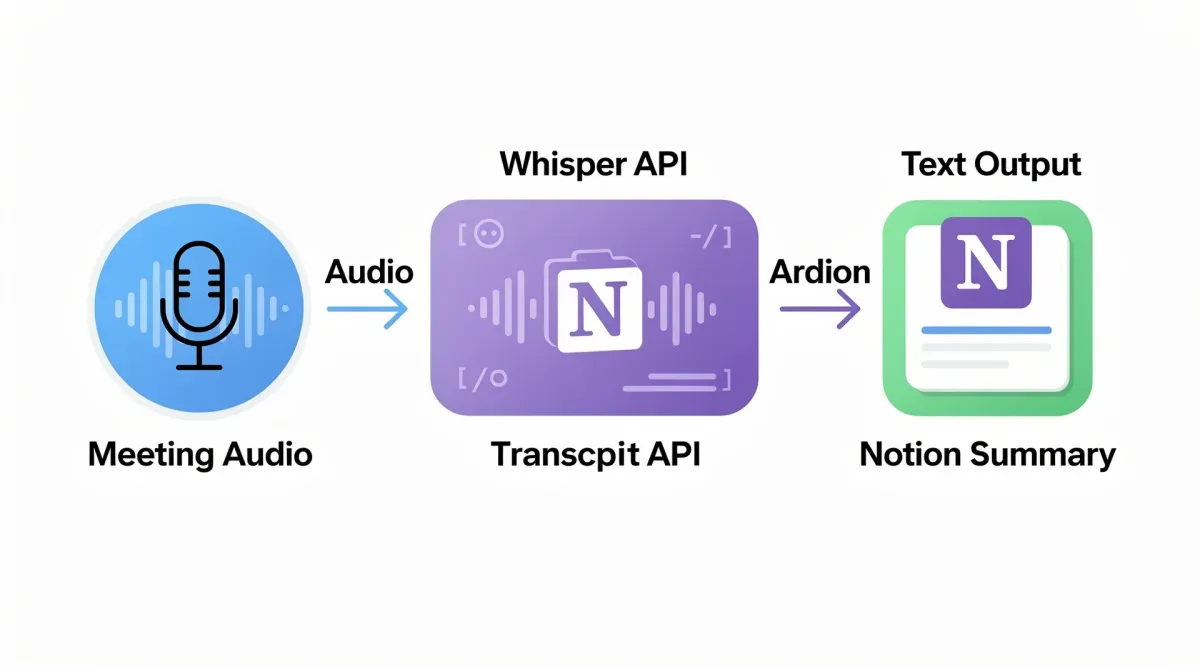
The beauty of this combination lies in its simplicity and effectiveness. Whisper handles the heavy lifting of converting spoken words into text, while Notion provides the structured database and collaborative features needed to make those transcripts actionable. This pipeline allows you to transform raw meeting audio into organized, searchable, and shareable summaries without significant manual intervention, paving the way for a more productive workflow.
Why Whisper API for transcription?
Whisper API stands out in the crowded field of speech-to-text services due to its exceptional accuracy and multilingual capabilities. Developed by OpenAI, it has been trained on a vast dataset of audio and text, enabling it to handle various languages and dialects with remarkable precision. This makes it an ideal choice for transcribing diverse meeting recordings.
- High Accuracy: Minimizes errors in transcription, providing a reliable text source for summarization.
- Multilingual Support: Can transcribe and translate audio in multiple languages, broadening its applicability for global teams.
- Robustness: Performs well even with background noise, accents, and multiple speakers, which are common in real-world meeting scenarios.
- Cost-Effective: Offers a highly competitive pricing model, making advanced transcription accessible to individuals and small businesses.
Leveraging Whisper API means you no longer have to worry about the quality of your audio recordings dictating the quality of your notes. It provides a solid foundation for the subsequent summarization steps, ensuring that the insights derived are based on accurate and complete information.
Setting up your Whisper API access
Before you can begin automating your meeting summaries, you need to set up access to the Whisper API. This involves obtaining an API key from OpenAI, which will authenticate your requests and allow you to utilize their powerful speech-to-text service. The process is straightforward and typically takes only a few minutes, making it an accessible starting point for anyone looking to integrate advanced AI into their workflow.
Once you have your API key, it's crucial to keep it secure. Treat it like a password, as it grants access to your OpenAI account and associated resources. Never hardcode it directly into public repositories or share it unnecessarily. Best practices involve using environment variables or secure configuration management systems to store and retrieve API keys, ensuring that your automated pipeline remains both functional and protected.
Obtaining your OpenAI API key
The first step is to visit the OpenAI platform and create an account if you don't already have one. The registration process is simple and requires basic information. After logging in, you'll navigate to the API key section, where you can generate a new secret key. This key is what allows your applications to communicate with the Whisper API.
- Sign up/Log in: Go to the OpenAI website and create an account or log in to an existing one.
- Navigate to API Keys: Find the 'API keys' section in your account dashboard.
- Generate New Key: Click on 'Create new secret key' to generate a unique key.
- Copy and Secure: Copy the generated key immediately and store it in a secure location. You will not be able to view it again after closing the window.
With your API key in hand, you are now ready to start interacting with the Whisper API. This foundational step is critical for building any application that leverages OpenAI's models, including our automated meeting summarization pipeline. It opens up a world of possibilities for integrating advanced AI capabilities into your daily tasks and workflows.
Integrating Whisper API with a simple script
With your Whisper API key ready, the next step is to write a simple script that can send your meeting audio files to the API for transcription. This script will serve as the core engine for converting spoken words into text, a crucial step before the summarization and organization in Notion. We'll use Python for this example, given its popularity in scripting and data processing, but the principles can be applied to other programming languages as well.
The script will handle reading an audio file, making an authenticated request to the Whisper API, and then receiving the transcribed text. This process is surprisingly straightforward, thanks to well-documented API endpoints and readily available client libraries. You'll soon see how quickly you can transform an audio recording into a comprehensive text document, ready for further processing.
A basic Python script for transcription
Here's a conceptual outline of what a Python script using the OpenAI library would look like. You'll need to install the openai library first (pip install openai).
import openai
import os

# Set your OpenAI API key from an environment variable
openai.api_key = os.getenv("OPENAI_API_KEY")

def transcribe_audio(audio_file_path):
    try:
        with open(audio_file_path, "rb") as audio_file:
            transcript = openai.Audio.transcribe("whisper-1", audio_file)
        return transcript["text"]
    except Exception as e:
        print(f"Error during transcription: {e}")
        return None

if __name__ == "__main__":
    meeting_audio = "path/to/your/meeting.mp3"  # Replace with your audio file path
    transcribed_text = transcribe_audio(meeting_audio)

    if transcribed_text:
        print("Transcription successful:")
        print(transcribed_text)
        # Here you would typically save this to a file or pass it to a summarizer
    else:
        print("Transcription failed.")
This script demonstrates the core functionality: opening an audio file, sending it to Whisper API, and printing the result. For real-world use, you might want to add error handling, support for different audio formats, and integrate it with a file management system. The key is to get the transcription working reliably, as this is the raw material for your summaries. Once you have this script functional, you're halfway to automating your meeting notes.
Structuring meeting summaries in Notion
Once you have the transcribed text from Whisper API, the next crucial step is to organize it effectively within Notion. Notion's flexible database capabilities make it an ideal platform for creating a structured repository of meeting summaries. By setting up a dedicated database, you can not only store the raw transcripts but also extract key information, tag participants, link to projects, and track action items, all within a single, interconnected workspace.
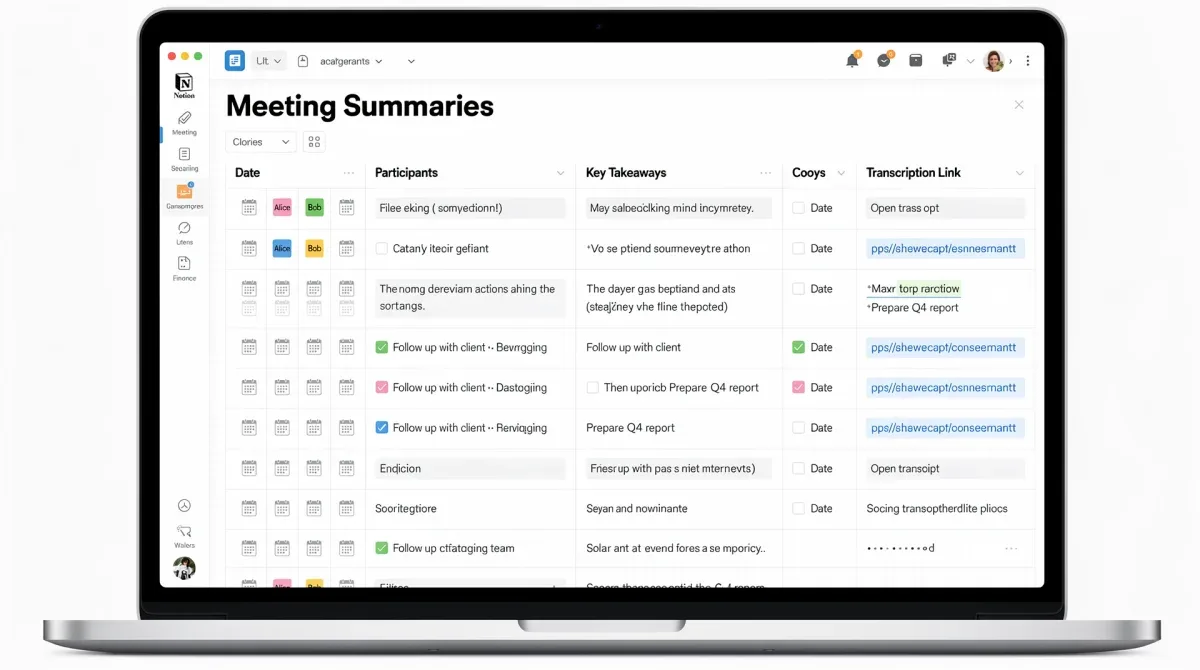
The power of Notion lies in its ability to adapt to your specific needs. You can define custom properties for each meeting entry, such as date, attendees, meeting type, and status. This structured approach transforms a simple text document into a dynamic, searchable, and highly useful knowledge base. Imagine quickly finding all decisions related to a specific project or reviewing action items assigned to a particular team member, all with a few clicks.
Designing your Notion meeting database
A well-designed Notion database is key to maximizing the value of your automated summaries. Consider what information is most critical for your team to track and retrieve. Here are some essential properties you might include:
- Meeting Name/Title: A clear, concise title for easy identification.
- Date: The date the meeting took place.
- Attendees: A multi-select or person property to tag participants.
- Key Takeaways: A text property to summarize the main points.
- Action Items: A checkbox or multi-select property to track tasks, potentially linking to a separate task database.
- Status: A select property (e.g., 'Completed', 'In Progress', 'Follow Up Required').
- Raw Transcript: A file or text property to store the full Whisper API output.
- Summary URL: A link to the generated summary (if using another tool for abstractive summarization).
By defining these properties, you create a robust system for managing your meeting information. Each entry in your Notion database becomes a rich, actionable record, far more valuable than a simple, unstructured text file. This proactive organization ensures that every meeting contributes meaningfully to your team's collective knowledge and progress, eliminating the common problem of information silos.
Automating the summarization and Notion update
Now that you have your Whisper API transcription and a structured Notion database, the final step is to connect these pieces to create a truly automated pipeline. This involves using a tool or script to take the transcribed text, optionally summarize it using another AI model (like a large language model such as GPT), and then programmatically update your Notion database. This is where the 30-minute promise truly comes to life, as you'll be automating the most time-consuming parts of the process.
There are several ways to achieve this automation, ranging from low-code solutions like Make (formerly Integromat) to custom Python scripts leveraging Notion's API. The choice depends on your technical comfort level and the complexity of your desired summarization logic. Regardless of the method, the goal is to minimize manual intervention, allowing your meeting summaries to populate themselves with minimal effort.
Connecting Whisper to Notion: Practical approaches
For those looking for a quick setup, low-code automation platforms are an excellent choice. They offer pre-built connectors for various services, including OpenAI and Notion, allowing you to create workflows with visual drag-and-drop interfaces.
- Using Zapier/Make:
- Trigger: New audio file uploaded to cloud storage (e.g., Google Drive, Dropbox).
- Action 1: Send audio to Whisper API for transcription.
- Action 2 (Optional): Send transcription to a large language model (e.g., ChatGPT via API) for abstractive summarization and extraction of key points/action items.
- Action 3: Create a new page in your Notion meeting database, populating properties with the summarized text, key points, and raw transcript.
- Custom Python Script:
- Step 1: Transcribe audio using the Whisper API script developed earlier.
- Step 2 (Optional): Integrate with another OpenAI model (like GPT-4) to generate a concise summary, identify action items, and extract key decisions from the full transcript.
- Step 3: Use the Notion API (
pip install notion-client) to create a new page in your database and populate its properties with the extracted information.
By implementing one of these approaches, you establish a seamless flow of information. A meeting concludes, the audio is processed, and within minutes, a structured, summarized record appears in your Notion workspace. This not only saves immense time but also ensures consistency and immediate accessibility of meeting insights for all team members, fostering a more informed and agile work environment.
Optimizing your pipeline for maximum efficiency
Building the core automated meeting summarization pipeline is a significant achievement, but the journey doesn't end there. To truly maximize its impact and ensure long-term effectiveness, it's crucial to optimize and refine your setup. This involves considering aspects like audio input quality, advanced summarization techniques, and integrating the pipeline more deeply into your existing workflows. A well-tuned pipeline will not only save time but also provide higher quality, more actionable insights from every meeting.
Optimization is an ongoing process. As you use the pipeline, you'll identify areas for improvement, whether it's tweaking summarization prompts, adjusting Notion database properties, or exploring new integrations. The goal is to make the system as autonomous and intelligent as possible, reducing the need for any manual intervention after the initial audio input. This continuous improvement ensures that your investment in automation continues to pay dividends.
Advanced tips for better summaries and workflow
To get the most out of your automated system, consider these advanced optimization strategies:
- Audio Pre-processing: Before sending audio to Whisper, consider using tools to reduce background noise or normalize volume levels. Clearer audio leads to more accurate transcriptions.
- Prompt Engineering for Summarization: If you're using a large language model for abstractive summarization, experiment with different prompts. Specify the desired output format (e.g., bullet points for key decisions, separate list for action items) and tone.
- Speaker Diarization: For multi-speaker meetings, explore advanced tools or future Whisper updates that offer speaker diarization, identifying who said what. This can greatly improve the readability and utility of transcripts and summaries.
- Template Standardization: Create a standardized meeting agenda and structure. This consistency will make it easier for AI models to identify and extract relevant information for summarization.
- Integration with Calendar: Automate the audio recording and uploading process by integrating with your calendar. For example, automatically start recording when a scheduled meeting begins and upload the file when it ends.
- Regular Review and Feedback: Periodically review the generated summaries for accuracy and relevance. Use this feedback to refine your summarization prompts or Notion database structure.
By implementing these optimization techniques, your automated meeting summarization pipeline will evolve from a functional tool into an indispensable asset. It will not only save time but also enhance the strategic value of your meetings, ensuring that every discussion is captured, understood, and acted upon efficiently. This continuous refinement is key to maintaining a cutting-edge and highly productive workflow in the digital age.
| Key Aspect | Brief Description |
|---|---|
| Whisper API | OpenAI's advanced speech-to-text model for highly accurate audio transcription. |
| Notion Integration | Flexible workspace for organizing, summarizing, and tracking meeting outcomes. |
| Automation Pipeline | Connecting Whisper transcripts to Notion databases using scripts or low-code tools. |
| Efficiency Gains | Reduces manual note-taking time, improves accuracy, and ensures quick access to insights. |
Frequently asked questions
What is the Whisper API?▼The Whisper API is an advanced speech-to-text model developed by OpenAI. It excels at transcribing audio into text with high accuracy, supporting multiple languages and performing well even in challenging audio environments. It forms the foundation for converting spoken meeting content into a usable text format for summarization.
Why use Notion for meeting summarization?▼Notion provides a highly flexible and customizable workspace perfect for organizing meeting summaries. Its database features allow you to structure information with custom properties like dates, attendees, action items, and key takeaways, making summaries searchable, shareable, and actionable for teams.
How long does it take to set up this pipeline?▼The core pipeline, from obtaining an API key to setting up a basic transcription script and Notion database, can be established in approximately 30 minutes. Advanced features like abstractive summarization and deeper integrations might require additional time for fine-tuning and configuration.
Do I need coding skills to build this?▼Basic coding knowledge (e.g., Python) is helpful for scripting the Whisper API integration. However, low-code automation platforms like Zapier or Make offer visual interfaces that allow users to build the pipeline with minimal to no coding, making it accessible to a broader audience.
Can this pipeline handle multiple speakers and languages?▼Whisper API is robust enough to handle multiple speakers and transcribe in various languages. While basic Whisper doesn't automatically differentiate speakers, its high accuracy in transcription provides a solid base. Further optimization or advanced tools can enhance speaker diarization for complex multi-person discussions.
Conclusion
The ability to build an automated meeting summarization pipeline in 30 minutes using Whisper API and Notion represents a significant leap forward in productivity and information management. By leveraging the power of AI for transcription and the flexibility of Notion for organization, teams can eliminate the drudgery of manual note-taking, ensuring that every valuable insight from a meeting is captured, summarized, and made actionable. This transformation not only saves countless hours but also fosters a more efficient, informed, and collaborative work environment. Embrace this digital innovation to redefine how your team approaches meetings, turning them into sources of clear, concise, and immediately accessible intelligence.
