Ergonomic Office Chair Guide: Prevent 8-Hour Strain
An ergonomic office chair, specifically with effective lumbar support adjustments, is crucial for preventing the physical strain associated with prolonged sitting, promoting better posture, and enhancing overall comfort and productivity throughout an 8-hour workday.
Sitting for extended periods is an unavoidable reality for many professionals, but it doesn't have to lead to discomfort or chronic pain. This ergonomic office chair guide: 5 lumbar support adjustments that prevent 8-hour strain is your essential resource for transforming your workday experience. Learn how precise adjustments can safeguard your back and boost your overall well-being.
Understanding the Importance of Lumbar Support
Lumbar support is often discussed but rarely fully understood. It refers to the inward curve at the base of your spine, known as the lumbar region. When you sit without adequate support, your natural lumbar curve can flatten, leading to poor posture, increased pressure on your spinal discs, and eventually, pain. An ergonomic office chair is designed to maintain this natural curve, promoting a healthy spine alignment.
The impact of proper lumbar support extends beyond merely preventing back pain. It influences your entire musculoskeletal system, from your neck to your hips. When your lower back is correctly supported, the rest of your spine naturally aligns, reducing strain on your neck and shoulders, and improving circulation. This holistic benefit makes lumbar support a cornerstone of any effective ergonomic setup.
Why your lower back needs extra care
Your lower back bears a significant portion of your upper body weight and is highly susceptible to strain during prolonged sitting. Without proper support, your muscles work harder to maintain an upright posture, leading to fatigue and discomfort. Over time, this can contribute to more serious conditions like sciatica or herniated discs.
- Reduces disc compression: Proper support helps distribute pressure evenly across spinal discs.
- Prevents muscle fatigue: Lessens the effort required by back muscles to maintain posture.
- Maintains natural spinal curvature: Keeps the spine in its healthiest, most stable position.
- Improves overall posture: Encourages a healthier alignment throughout the entire spine.
Ignoring the need for effective lumbar support is akin to ignoring the foundation of a building; eventually, structural problems will arise. Investing time in understanding and utilizing your chair's lumbar support features is an investment in your long-term health and productivity.

Adjustment 1: Height of Lumbar Support
The first and perhaps most critical adjustment for effective lumbar support is its height. The lumbar curve varies slightly from person to person, so a one-size-fits-all approach simply won't work. The goal is to position the support so it nestles perfectly into the natural inward curve of your lower back, providing gentle yet firm pressure.
Typically, the sweet spot for lumbar support is around belt-line level, or slightly above. However, it's essential to feel where your own lumbar curve is most prominent. Some chairs offer a vertical adjustment mechanism, allowing you to slide the lumbar pad up or down. Others might have a fixed backrest design, meaning you need to adjust your sitting posture within the chair to align with its support.
Finding your ideal lumbar height
To find the optimal height, sit upright in your chair, with your feet flat on the floor. Close your eyes and lean back, feeling where the chair's lumbar support makes contact with your back. Adjust it slowly up and down until you feel it filling the natural curve of your spine most comfortably. It should feel supportive, not pushy or intrusive.
- Start at belt level: A good general starting point for most individuals.
- Feel for the curve: Identify the deepest part of your lower back's inward curve.
- Test different heights: Spend a few minutes at each position to assess comfort.
- Avoid discomfort: If it feels like it's pushing too high or too low, adjust further.
Proper lumbar height prevents your pelvis from tilting backward, which often leads to a rounded lower back and increased pressure on your spinal discs. This simple adjustment can make a world of difference in preventing strain during long work hours.
Adjustment 2: Depth of Lumbar Support
Once the height is set, the next crucial adjustment is the depth of the lumbar support. This refers to how far the lumbar pad protrudes into your back. Too little depth, and the support will be ineffective; too much, and it can create uncomfortable pressure points, forcing your spine into an unnatural position. The ideal depth provides enough support to maintain your natural curve without feeling like it's pushing you forward excessively.
Many high-quality ergonomic chairs feature a knob or lever that allows you to increase or decrease the depth of the lumbar support. This fine-tuning capability is what truly personalizes the chair to your body. It's not just about having lumbar support, but about having the right amount of it for your specific needs.
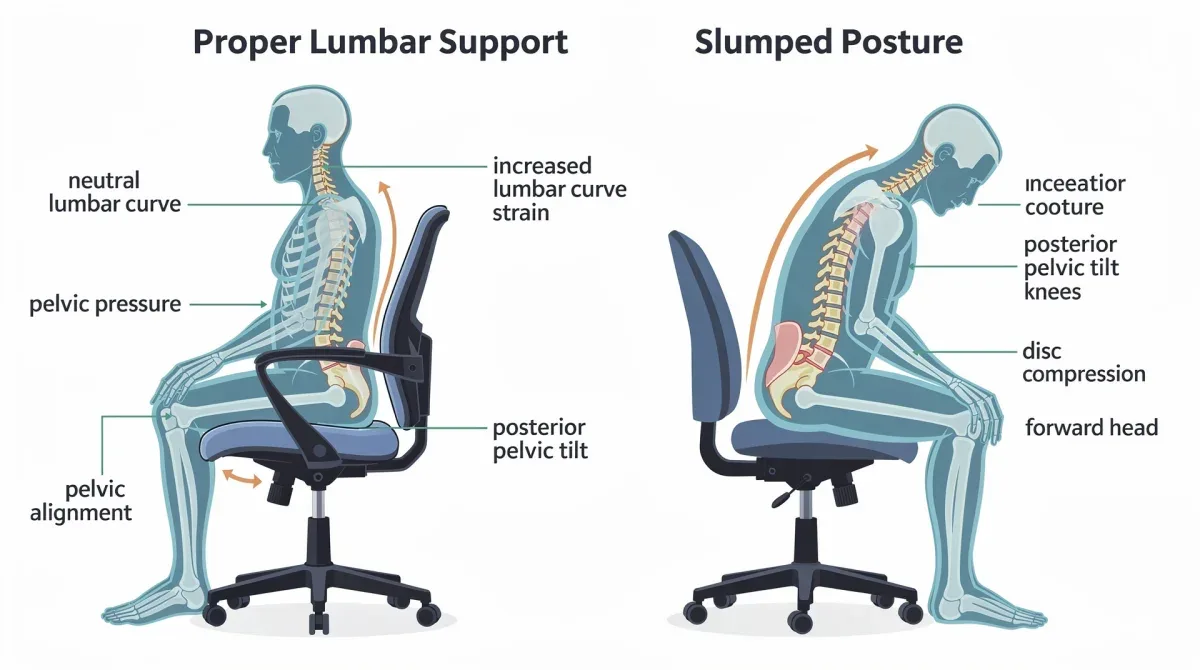
Calibrating the perfect pressure
Start with minimal depth and gradually increase it. Lean back into the chair and assess the feeling. You want to feel a gentle, consistent push that helps maintain the natural 'S' curve of your spine. If you feel any sharp pressure or discomfort, reduce the depth. The goal is to feel supported, not compressed.
Consider your body type when adjusting depth. Individuals with a more pronounced natural lumbar curve might require greater depth, while those with a flatter back might need less. It’s a highly personal setting that requires experimentation to get just right. Remember that your comfort is the ultimate indicator of a correctly adjusted chair.
Adjustment 3: Tension of Lumbar Support
Beyond height and depth, some advanced ergonomic chairs offer tension adjustment for their lumbar support. This feature controls the firmness or resistance of the lumbar mechanism. A softer tension might be preferred by those who like a more gentle cradling, while a firmer tension provides more rigid, constant support. This adjustment is less common but highly beneficial for maximizing personalized comfort.
The tension setting often works in conjunction with the depth. If the depth is set aggressively, a softer tension can balance it out, preventing excessive pressure. Conversely, if you prefer a subtle depth, a slightly firmer tension can ensure the support is still effective throughout your movements. It’s about finding the perfect equilibrium.
Balancing firmness and comfort
To adjust tension, recline slightly and feel how the lumbar support responds. If it feels too rigid and unyielding, decrease the tension. If it feels too soft and allows your back to slump, increase it. The ideal tension allows for slight movement while still providing continuous support to your lower back.
- Consider your weight: Heavier individuals might prefer more tension for adequate support.
- Assess movement: The support should move with you, not restrict you.
- Personal preference: Ultimately, it comes down to what feels most comfortable and supportive for you.
- Trial and error: Don't be afraid to experiment with different settings over a few days.
This nuanced adjustment helps prevent your back from feeling fatigued by either fighting against an overly stiff support or sinking into one that's too yielding. It contributes significantly to sustained comfort during an 8-hour workday, adapting to your body's subtle shifts.
Adjustment 4: Dynamic Lumbar Support
Dynamic lumbar support is a feature found in more advanced ergonomic chairs, designed to adapt and move with you as you shift positions throughout the day. Unlike static lumbar pads that provide constant support in one fixed position, dynamic support flexes and adjusts to maintain contact with your lower back, whether you're leaning forward, reclining, or shifting side to side. This constant adaptation is crucial for preventing strain that can occur when static support becomes misaligned with your changing posture.
This type of support is particularly beneficial for individuals who tend to move a lot while working or those who spend long hours at their desk. It ensures that your lumbar region is continuously supported, minimizing the chances of developing discomfort or pain due to lack of consistent ergonomic alignment. It's a key differentiator in preventing strain over an extended period.
The benefits of active back support
Active lumbar support promotes micro-movements and prevents the rigidity that can arise from holding a single posture for too long. It encourages a healthier range of motion while simultaneously providing the necessary spinal alignment. This adaptive quality makes it an invaluable feature for a truly ergonomic setup.
- Continuous contact: Maintains support even as you shift positions.
- Reduced static load: Prevents muscles from overworking due to fixed postures.
- Enhanced circulation: Encourages slight movement, aiding blood flow.
- Improved comfort: Adapts to your body's natural movements, reducing fatigue.
While dynamic lumbar support might not have specific 'adjustments' in the traditional sense, understanding its function allows you to choose a chair that provides this advanced level of care for your spine. It represents a significant step forward in ergonomic design, actively contributing to preventing 8-hour strain.
Adjustment 5: Lumbar Support with Recline Tension
The final adjustment combines lumbar support with the chair's recline tension. Many ergonomic chairs allow you to recline the backrest, which can be beneficial for taking pressure off your spine throughout the day. However, if the lumbar support doesn't maintain its position or if the recline tension is too loose or too stiff, the ergonomic benefits are lost. The goal is to recline comfortably while your lumbar region remains adequately supported.
Adjusting the recline tension allows you to control the effort needed to recline and how easily the chair returns to an upright position. When combined with proper lumbar settings, this ensures that even when you lean back, your lower spine is still cradled and protected. This is crucial for varied postures throughout an 8-hour workday, preventing any gaps in support.
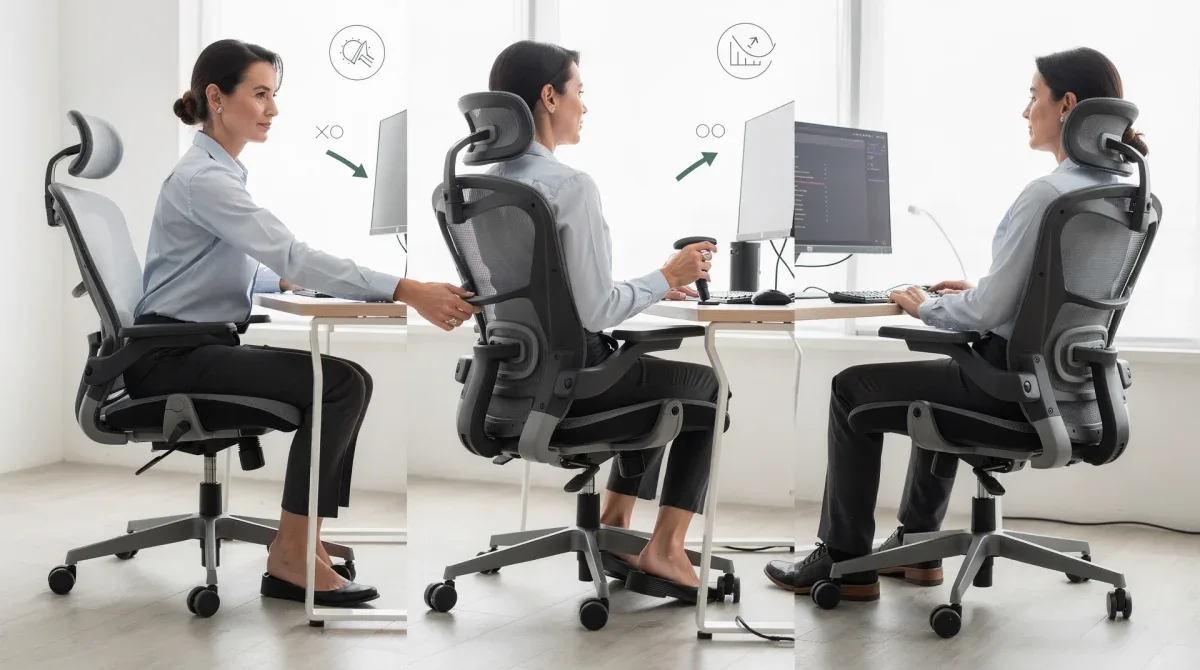
Optimizing recline for spinal health
To optimize this, first set your lumbar height and depth. Then, adjust the recline tension so you can lean back comfortably without feeling like you're falling backward or straining to stay reclined. The lumbar support should ideally move with the backrest, maintaining contact with your lower back.
Experiment with different recline angles throughout your workday. A slight recline can relieve pressure, while a deeper recline might be suitable for short breaks. Ensure that at every angle, your lumbar support is engaged. This integrated approach to chair adjustment is vital for comprehensive strain prevention.
Holistic Ergonomic Setup Beyond Lumbar Support
While lumbar support is undeniably critical, it's just one piece of the ergonomic puzzle. A truly effective ergonomic setup considers all aspects of your workstation to ensure optimal comfort and health. Ignoring other adjustments can negate the benefits of even the most perfectly calibrated lumbar support. Think of your chair as part of a larger system designed to support your body's natural alignment and movement.
A holistic approach means looking at seat height, armrest position, seat depth, and even your desk and monitor setup. Each element plays a role in distributing pressure, maintaining posture, and preventing strain. A chair's adjustability is only as good as your willingness to use all its features in concert. This integrated view ensures that your entire body is supported, not just your lower back.
Key complementary adjustments
Beyond lumbar support, several other adjustments contribute significantly to an ergonomic workstation. Addressing these elements ensures that your body is in a neutral, relaxed position, minimizing stress on joints and muscles. These adjustments are often interconnected, and changing one may require a slight tweak to another.
- Seat Height: Adjust so your feet are flat on the floor and your knees are at a 90-degree angle, or slightly lower than your hips.
- Armrest Position: Set them so your arms are at a 90-degree angle, allowing your shoulders to relax. They should support your forearms, not push your shoulders up.
- Seat Depth: Ensure there are 2-4 fingers' width between the edge of the seat and the back of your knees. This prevents pressure on your circulation.
- Backrest Angle: While related to recline, the initial backrest angle should support an upright posture without forcing you too far forward or backward.
These adjustments, when combined with proper lumbar support, create a comprehensive ergonomic environment. Regularly reviewing and fine-tuning these settings can prevent various musculoskeletal issues, ensuring you remain comfortable and productive throughout your 8-hour workday and beyond. It's about creating a dynamic, supportive space that encourages healthy posture and movement.
| Key Adjustment | Benefit for 8-Hour Strain |
|---|---|
| Lumbar Height | Aligns support with your spine's natural curve, preventing slouching. |
| Lumbar Depth | Provides gentle, consistent pressure to maintain spinal 'S' curve. |
| Dynamic Lumbar | Adapts to shifting postures, ensuring continuous, active back support. |
| Recline Tension | Allows comfortable recline while maintaining essential lumbar contact and support. |
Frequently asked questions about ergonomic chairs
What exactly is lumbar support and why is it so important?▼Lumbar support refers to the inward curve at the base of your spine. It's crucial because it helps maintain your spine's natural 'S' shape when sitting, preventing slouching and reducing pressure on spinal discs. This support minimizes muscle fatigue and prevents common back pain from prolonged sitting.
How often should I adjust my ergonomic office chair?▼Ideally, you should make initial adjustments when you first get the chair. After that, it's beneficial to re-evaluate your settings periodically, perhaps every few months, or if you notice new discomfort. Small tweaks can be made throughout the day if you change tasks or feel a need to shift your posture.
Can an ergonomic chair completely eliminate back pain?▼While an ergonomic chair significantly reduces the risk and severity of back pain, it might not eliminate it entirely, especially if pain stems from pre-existing conditions. It's a powerful tool for prevention and management, but should be combined with regular movement, stretching, and proper posture habits.
What if my chair doesn't have all five lumbar adjustments?▼Many chairs offer a subset of these adjustments. Focus on optimizing what's available. Even basic height and depth adjustments can provide significant benefits. If your chair lacks specific features, consider external lumbar support cushions, but prioritize chairs with more built-in adjustability for better results.
Are standing desks a better alternative to ergonomic chairs?▼Neither is inherently 'better'; the ideal approach is a combination of both. Alternating between sitting and standing throughout the day is highly recommended to promote circulation and reduce static load on your spine. An ergonomic chair complements a standing desk by providing supportive seating when you choose to sit.
Conclusion
Navigating the complexities of an ergonomic office chair, particularly its lumbar support features, is a vital step toward a healthier and more productive workday. By understanding and meticulously adjusting the height, depth, tension, dynamic capabilities, and recline integration of your chair's lumbar support, you can significantly mitigate the common strains associated with prolonged sitting. This guide has illuminated the path to transforming your workspace from a source of discomfort into a sanctuary of support. Remember, your well-being at work is paramount, and a properly configured ergonomic chair is an investment that pays dividends in comfort, health, and sustained productivity. Take the time to fine-tune your setup; your back will thank you.
