Smart Thermostat Setup: Cut Heating Bills with Matter
Setting up a Matter-certified smart thermostat is a straightforward process that empowers homeowners to optimize heating, achieve significant energy savings, and potentially reduce heating bills by up to 12% through smart scheduling and advanced control features.
Embarking on the journey to reduce your home’s energy consumption and lower those persistent heating bills is simpler than you might imagine, especially with a Matter-certified smart thermostat. This guide will walk you through every essential step, from initial installation to advanced optimization, ensuring you harness the full potential of this innovative technology to achieve substantial savings and enhanced comfort.
Understanding Matter and its benefits for smart thermostats
Before diving into the installation, it’s crucial to grasp what Matter is and why it’s a game-changer for your smart home, particularly your thermostat. Matter is an open-source connectivity standard designed to create a more unified, reliable, and secure smart home ecosystem. For thermostats, this means unparalleled compatibility and ease of use, eliminating the frustrations often associated with proprietary systems.
The beauty of Matter lies in its promise of interoperability. No longer will you be locked into a single brand or ecosystem; a Matter-certified thermostat can communicate seamlessly with other Matter-enabled devices, regardless of their manufacturer. This not only simplifies your smart home setup but also future-proofs your investment, ensuring your thermostat remains compatible with evolving technologies.
Key advantages of Matter certification
- Universal Compatibility: Works across different smart home platforms like Apple HomeKit, Google Home, Amazon Alexa, and Samsung SmartThings.
- Enhanced Security: Built-in encryption and authentication protocols protect your data and privacy.
- Local Control: Many functions can operate locally without an internet connection, improving responsiveness and reliability.
- Simplified Setup: Streamlined pairing processes make installation quicker and less complex.

Beyond convenience, Matter-certified thermostats offer tangible benefits for energy efficiency. By integrating more tightly with other smart sensors and systems, they can make more intelligent decisions about heating, adapting to real-time conditions like occupancy and outdoor temperature more effectively than ever before. This advanced level of automation is key to achieving the projected 12% reduction in heating bills.
Pre-installation checklist: What you need before you start
A successful smart thermostat installation begins long before you pick up a screwdriver. A thorough pre-installation checklist ensures you have all the necessary tools, information, and compatibility confirmations to avoid common pitfalls. Taking the time for these preparatory steps can save you significant headaches and ensure a smooth setup experience, ultimately leading to faster energy savings.
First, verify your HVAC system's compatibility. Most smart thermostats work with 24V common (C-wire) systems, which provide continuous power. If your current thermostat doesn't have a C-wire, you might need to install one, use a power extender kit (often included with the thermostat), or opt for a model that doesn't require a C-wire, though these are less common for advanced smart thermostats.
Essential tools and information
- Screwdriver Set: Both Phillips and flathead are usually required.
- Wire Strippers: If new wires need to be exposed.
- Smartphone or Tablet: For the companion app and Matter pairing.
- Existing Thermostat Wiring Diagram: Take a photo of your current wiring before disconnecting anything.
- HVAC System Type: Note whether it's a conventional, heat pump, or dual-fuel system.
Additionally, ensure your home’s Wi-Fi network is stable and covers the thermostat's location. A strong, reliable Wi-Fi connection is crucial for the smart features and remote control capabilities of your Matter-certified thermostat. Confirming these details upfront will streamline the installation and prevent unexpected delays, setting the stage for optimal performance and energy efficiency.
Step-by-step installation of your Matter-certified smart thermostat
Installing a Matter-certified smart thermostat might seem daunting, but by following a clear, methodical approach, you can successfully complete the process and begin enjoying its benefits. This section breaks down the installation into manageable steps, focusing on safety and accuracy to ensure proper functionality and integration with your home's heating system.
Always begin by turning off the power to your HVAC system at the circuit breaker. This is a critical safety step to prevent electrical shocks and damage to your equipment. Once the power is off, carefully remove your old thermostat's cover and take a clear photograph of the wiring connections. This photo will be your invaluable reference when connecting the new thermostat.
Wiring and mounting the new thermostat
- Disconnect Old Wires: Label each wire with the corresponding terminal letter as you disconnect it from your old thermostat. Many smart thermostats come with pre-printed labels for this purpose.
- Remove Old Baseplate: Unscrew and remove the old thermostat's mounting plate from the wall.
- Mount New Baseplate: Position the new thermostat's baseplate, ensuring it's level, and secure it to the wall using the provided screws. You might need to use wall anchors if screwing into drywall.
- Connect New Wires: Carefully connect the labeled wires to the appropriate terminals on the new baseplate, referring to your photograph and the new thermostat's wiring diagram. Ensure each wire is securely seated.
- Attach Thermostat Body: Snap or screw the main thermostat unit onto the baseplate.
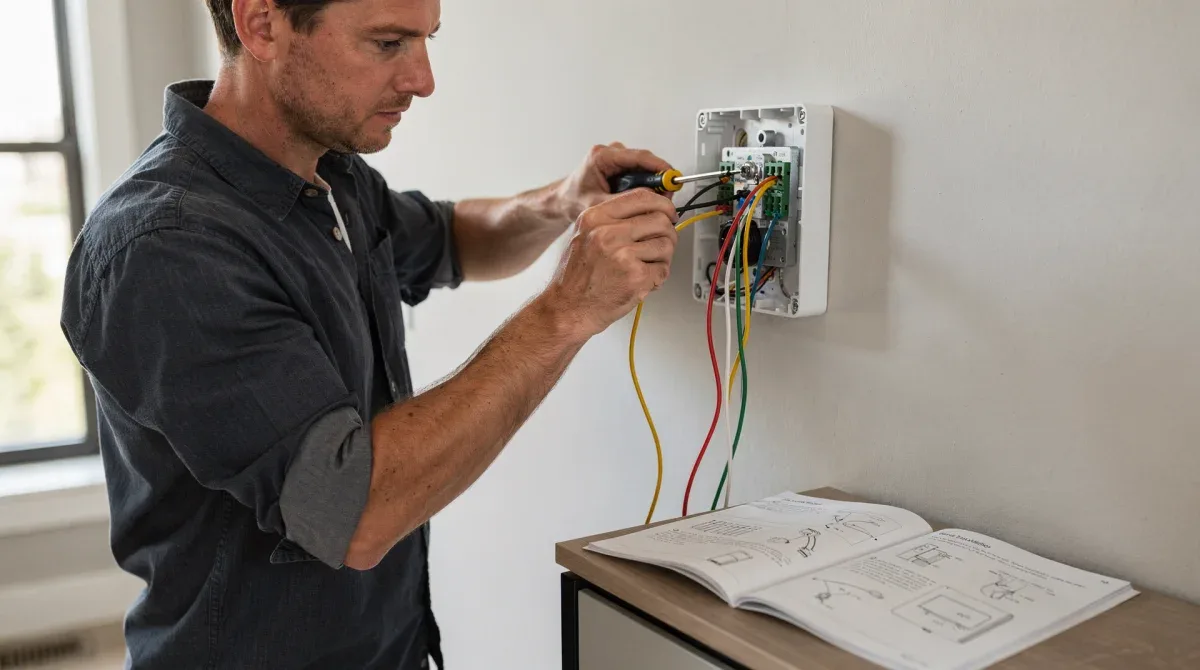
After physical installation, restore power to your HVAC system. Your thermostat should power on, often displaying a welcome screen. Follow the on-screen prompts or the companion app's instructions to connect it to your home Wi-Fi and initiate the Matter pairing process. This typically involves scanning a QR code or entering a numerical code provided with the device, seamlessly integrating it into your smart home ecosystem.
Configuring your Matter thermostat for optimal energy savings
Once your Matter-certified smart thermostat is installed and connected, the real work of saving energy begins with thoughtful configuration. Proper settings and scheduling are paramount to maximizing efficiency and achieving the desired reduction in heating bills. This involves understanding your home's unique heating patterns and adapting the thermostat to your lifestyle.
Start by setting up a personalized schedule. Most smart thermostats allow for different temperature settings throughout the day and week. Program lower temperatures when you're away or asleep, and warmer temperatures when you're typically home and active. Remember, even a small adjustment of a few degrees can lead to significant savings over time.
Leveraging smart features for efficiency
- Geofencing: Uses your smartphone's location to automatically adjust the temperature when you leave or approach home.
- Learning Capabilities: Some thermostats learn your preferences over time and create optimized schedules automatically.
- Occupancy Sensors: Detect when rooms are empty and adjust temperatures accordingly, preventing wasted heating.
- Energy Reports: Review detailed reports on your heating usage to identify areas for further improvement.
Integrate your thermostat with other Matter-enabled devices, such as door/window sensors, to create advanced automation routines. For instance, you can configure your heating to pause automatically if a window is left open. Regularly review your energy usage reports and adjust your schedule as needed to fine-tune your settings for maximum comfort and savings. This proactive approach ensures your thermostat is always working smarter, not just harder.
Integrating your smart thermostat with your smart home ecosystem
The true power of a Matter-certified smart thermostat is fully realized when it's seamlessly integrated into your broader smart home ecosystem. Matter’s universal compatibility means your thermostat can communicate and coordinate with a wide array of other smart devices, enhancing automation, convenience, and ultimately, your home’s overall energy intelligence. This interconnectedness allows for sophisticated routines that optimize comfort and efficiency beyond simple scheduling.
After pairing your thermostat with your Matter controller (e.g., Apple Home Hub, Google Nest Hub, Amazon Echo), explore the integration options within your preferred smart home app. You'll find that your thermostat can now be part of complex scenes and automations involving lights, blinds, and even air quality monitors. For example, a 'Good Morning' scene could not only turn on your lights but also adjust the thermostat to your preferred wake-up temperature.
Creating advanced automation rules
- Occupancy-based heating: Use motion sensors to only heat rooms when occupied.
- Weather-adaptive adjustments: Integrate with local weather forecasts to pre-heat or pre-cool your home.
- Voice control: Easily adjust temperatures with voice commands through smart speakers.
- Away mode automation: Link with security systems to automatically switch to an energy-saving 'away' mode when you leave.
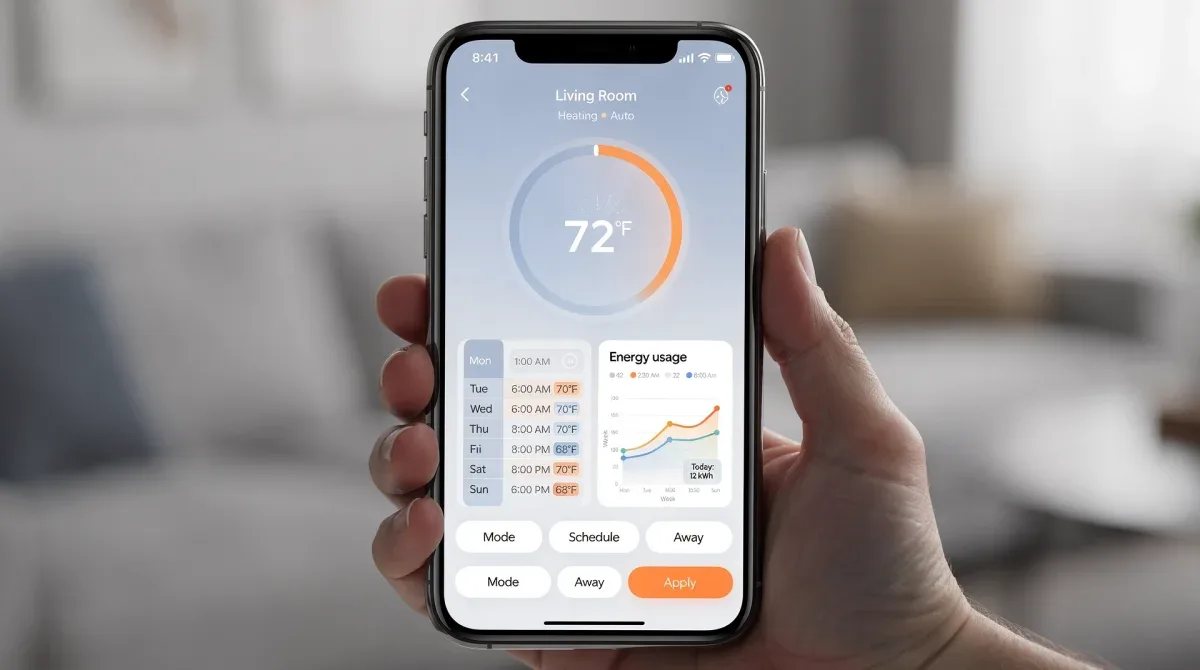
The beauty of Matter is that these integrations are no longer confined to specific brands. You can mix and match devices from different manufacturers, confident that they will all work together harmoniously. This flexibility allows you to build a truly personalized and efficient smart home, ensuring your Matter thermostat contributes significantly to both your comfort and your energy savings goals.
Troubleshooting common issues and maintaining your thermostat
Even with careful installation, smart devices can sometimes encounter hiccups. Knowing how to troubleshoot common issues and perform routine maintenance on your Matter-certified smart thermostat will ensure its long-term reliability and continued energy efficiency. Most problems can be resolved with simple checks, preventing the need for professional assistance.
If your thermostat isn't powering on, first check the circuit breaker to ensure power is restored to your HVAC system. If power is present, re-examine the wiring connections at the thermostat baseplate to confirm they are secure and correctly seated in their terminals. A loose C-wire is a frequent culprit for power issues.
Resolving connectivity and performance problems
- Wi-Fi connectivity: Ensure your router is operational and within range. Try rebooting both your router and the thermostat.
- Matter pairing issues: If pairing fails, try resetting the thermostat to factory settings and restarting the pairing process. Check for firmware updates for your Matter controller.
- Inaccurate temperature readings: Ensure the thermostat is not exposed to direct sunlight, drafts, or heat sources (like lamps or electronics) that could skew readings.
- HVAC not responding: Verify that your HVAC system is receiving power and that the thermostat’s settings (e.g., heating mode) are correctly configured.
For maintenance, periodically clean the thermostat’s vents to prevent dust buildup, which can affect temperature sensor accuracy. Check the battery levels if your model uses them, and ensure the companion app is updated to the latest version for optimal performance and access to new features. Regular checks and prompt troubleshooting will keep your Matter thermostat running smoothly, consistently delivering comfort and savings.
Maximizing your 12% heating bill reduction with Matter
Achieving and sustaining a 12% reduction in heating bills with your Matter-certified smart thermostat is an attainable goal, but it requires more than just initial setup. It involves continuous optimization, understanding advanced features, and making informed decisions about your home's energy use. This section delves into strategies to push your savings even further, ensuring you get the most out of your investment.
Beyond basic scheduling, delve into the deeper analytics provided by your thermostat's app. Many apps offer detailed energy consumption reports, showing you exactly when and how much energy is being used. Analyzing these patterns can reveal opportunities for further adjustments, such as fine-tuning setback temperatures or optimizing pre-heating times based on your home’s insulation performance.
Advanced strategies for greater savings
- Time-of-Use (TOU) optimization: If your utility offers TOU rates, program your thermostat to reduce heating during peak, more expensive hours.
- Weather integration: Use smart home routines that leverage local weather forecasts to adjust heating proactively, preventing your system from overworking.
- Zone control: If you have multiple Matter thermostats or smart vents, create zones to heat only occupied areas, significantly reducing wasted energy.
- Thermal mass utilization: In well-insulated homes, allow temperatures to drop slightly during unoccupied hours and rely on your home's thermal mass to retain comfort for longer periods.
Consider integrating your Matter thermostat with smart window coverings that automatically open to let in sunlight during cold days and close to retain heat at night. These synergistic integrations, facilitated by the Matter standard, create a holistic approach to energy management, allowing your smart thermostat to act as the central intelligence for a truly energy-efficient home, consistently working towards that 12%, or even greater, bill reduction.
| Key Point | Brief Description |
|---|---|
| Matter compatibility | Ensures universal interoperability with diverse smart home ecosystems. |
| Installation basics | Requires C-wire verification, safety precautions, and correct wiring. |
| Energy optimization | Utilize smart scheduling, geofencing, and occupancy sensors for savings. |
| Troubleshooting tips | Address common issues like power, Wi-Fi, and sensor accuracy. |
Frequently asked questions about Matter thermostats
What is a Matter-certified smart thermostat?▼A Matter-certified smart thermostat is a device that adheres to the Matter connectivity standard, ensuring universal compatibility across various smart home ecosystems like Apple Home, Google Home, and Amazon Alexa. This certification simplifies setup, enhances security, and allows for seamless integration with other Matter-enabled devices, boosting overall smart home interoperability and efficiency.
How much can I save on heating bills with a Matter thermostat?▼By effectively utilizing smart scheduling, geofencing, and other energy-saving features, homeowners can potentially reduce their heating bills by up to 12% or more. Actual savings depend on factors like home insulation, climate, and individual usage patterns, but smart thermostats consistently offer significant reductions compared to traditional models through optimized heating control.
Do I need a C-wire for a Matter-certified thermostat?▼Most advanced Matter-certified smart thermostats require a C-wire (common wire) to provide continuous power. While some models may offer battery power or power extender kits as alternatives, a C-wire generally ensures the most stable and reliable operation, preventing issues like flickering displays or connectivity drops. Always check your thermostat's specific requirements.
Can I control my Matter thermostat remotely?▼Yes, remote control is a core feature of Matter-certified smart thermostats. Once connected to your home Wi-Fi and paired with your Matter controller, you can manage your thermostat settings from anywhere using its companion app on your smartphone or tablet. This allows for convenient adjustments, even when you're away from home.
What if my Matter thermostat loses Wi-Fi connection?▼If your Matter thermostat loses its Wi-Fi connection, it will typically continue to operate based on its last programmed schedule, ensuring your home remains heated. However, smart features like remote control, energy reporting, and advanced automations will be temporarily unavailable until the connection is restored. Most Matter devices also offer local control for basic functions.
Conclusion
Embracing a Matter-certified smart thermostat represents a significant step towards a more intelligent, efficient, and comfortable home. By following this comprehensive guide, you can confidently install, configure, and integrate your new thermostat, unlocking its full potential to not only enhance your daily living but also make a tangible impact on your heating bills. The promise of up to a 12% reduction is well within reach, creating a warmer home and a lighter wallet.
