5 Open-Source PDF Tools for Accurate Table Extraction
Achieving 99% accuracy in extracting complex tables from PDFs is now attainable with five powerful open-source document parsing tools, revolutionizing data processing for various applications.
In today's data-driven world, the ability to accurately extract information from unstructured documents, especially PDFs, is paramount. Many organizations grapple with the challenge of converting complex PDF tables into usable data formats. This article delves into 5 Open-Source Document Parsing Tools That Extract Complex PDF Tables With 99% Accuracy, offering practical solutions for developers and data professionals alike.
The growing need for accurate PDF table extraction
PDFs are ubiquitous in business, academia, and government, serving as a standard format for sharing reports, invoices, research papers, and more. While excellent for presentation, PDFs often present significant hurdles when it comes to data extraction, particularly for tabular data. The static nature of PDFs means that tables, which appear visually structured to humans, are often just a collection of lines and text boxes to a machine. This inherent complexity makes automated extraction a formidable task, demanding sophisticated tools that can interpret visual cues and reconstruct logical data structures.
Manual data entry from PDFs is not only time-consuming but also prone to human error, leading to inefficiencies and potential data integrity issues. For businesses dealing with large volumes of PDF documents, an automated, highly accurate extraction solution is not just a convenience, but a necessity. The demand spans various sectors, including finance, healthcare, legal, and manufacturing, where extracting data from financial statements, medical records, contracts, and inventory reports is a daily operation. Without reliable tools, these processes can become bottlenecks, hindering data analysis, reporting, and decision-making.
Challenges in PDF table parsing
PDFs come in many forms, from digitally native documents with embedded text to scanned images of physical papers. Each presents its own set of challenges. Digitally native PDFs might have inconsistent spacing, merged cells, or complex layouts that confuse simple parsing algorithms. Scanned PDFs, on the other hand, require optical character recognition (OCR) before any table detection can even begin, adding another layer of complexity and potential error. Furthermore, tables can span multiple pages, contain headers that aren't clearly delineated, or include footnotes and annotations that need to be excluded from the core data.
- Varying PDF structures: Different generators produce PDFs with diverse internal structures.
- Complex table layouts: Merged cells, multi-line headers, and nested tables are common.
- Image-based PDFs: Requires robust OCR integration for text recognition.
- Cross-page tables: Tables extending over several pages complicate continuity.
Overcoming these challenges requires not just advanced algorithms but also a deep understanding of how tables are visually and logically represented. Open-source tools, driven by community contributions and continuous development, often provide flexible and innovative solutions to these persistent problems. They allow users to inspect the code, customize functionalities, and contribute to improvements, fostering a robust ecosystem for data extraction. This collaborative approach often leads to tools that are both powerful and adaptable to a wide range of parsing scenarios, ultimately delivering higher accuracy rates.
Camelot: precise table extraction for data scientists
Camelot is a Python library specifically designed to extract tabular data from PDFs. What sets Camelot apart is its dual approach to table detection: 'lattice' and 'stream'. The 'lattice' method is ideal for PDFs where tables have clearly defined lines, mimicking a spreadsheet. The 'stream' method, conversely, excels with tables that lack explicit lines but use whitespace to separate columns, a common scenario in many modern document designs. This versatility makes Camelot a powerful choice for a broad spectrum of PDF documents, from structured reports to more visually fluid layouts.
Developed with data scientists and analysts in mind, Camelot emphasizes precision and control. Users can specify page numbers, areas within pages, and even custom table settings to refine the extraction process. It provides granular control over how tables are identified and parsed, allowing for adjustments that can significantly boost accuracy, especially with challenging layouts. The output can be easily integrated into data analysis workflows, as it supports various formats like CSV, JSON, Excel, and Pandas DataFrames, which are standard for data manipulation in Python.
Key features and advantages of Camelot
Camelot's strength lies not only in its robust algorithms but also in its user-friendly API, which simplifies the process of integrating PDF table extraction into larger data pipelines. Its ability to handle both lattice and stream tables effectively means fewer manual interventions and more reliable automated processing. The tool also provides visual debugging, allowing users to inspect how tables are detected and identify potential issues, which is invaluable for fine-tuning extraction parameters. This feature alone can save countless hours of trial and error, enabling users to achieve high accuracy quickly.
- Two parsing methods: 'Lattice' for ruled tables, 'Stream' for rule-less tables.
- Granular control: Define page areas, table settings, and parsing parameters.
- Multiple output formats: Exports to CSV, JSON, Excel, and Pandas DataFrames.
- Visual debugging: Helps in understanding and correcting parsing errors.
The open-source nature of Camelot fosters a community of users who contribute to its development and provide support. This collaborative environment ensures that the tool remains current with new PDF complexities and user needs. Its Pythonic interface makes it accessible to a wide audience of developers and data professionals already familiar with the language, lowering the barrier to entry for implementing sophisticated PDF data extraction solutions. For those seeking a highly customizable and accurate tool, Camelot stands out as a top contender.
Tabula-py: simplifying table extraction for web developers
Tabula-py is a Python wrapper for Tabula, a tool designed to extract tables from PDFs. While Tabula itself is a Java-based application with a graphical user interface (GUI), Tabula-py brings its powerful table extraction capabilities to the Python ecosystem, making it accessible for scripting and automation. This is particularly appealing to web developers and backend engineers who prefer working within a Python environment and need to integrate PDF parsing into their applications or data processing pipelines. Tabula-py inherits the core functionality of Tabula, which is known for its ability to accurately identify and extract tables, even from poorly structured or scanned PDFs.
One of Tabula-py's significant advantages is its simplicity. It allows users to specify an area on a page where a table is located, or to let the tool automatically detect tables. This flexibility is crucial when dealing with diverse PDF layouts. For scanned documents, Tabula-py can leverage OCR technologies (though usually requiring an external OCR engine) to first convert images to text before attempting table extraction, ensuring that data from non-selectable PDFs can also be processed. The output is typically in CSV or JSON format, which are readily consumable by most web applications and data analysis tools.
How Tabula-py enhances data workflows
Tabula-py's integration into Python workflows makes it an excellent choice for automating routine data extraction tasks. Imagine a scenario where a web application needs to process daily reports in PDF format and extract specific tables for database updates. Tabula-py can be scripted to perform this task automatically, reducing manual effort and potential errors. Its ability to work with both specified areas and automatic detection provides a balance between control and convenience, making it adaptable to various use cases. The tool's robust handling of different table structures contributes to its high accuracy, especially when combined with careful parameter tuning.

- Python wrapper for Tabula: Leverages Tabula's robust Java engine.
- Area selection: Precisely define table boundaries for focused extraction.
- Automatic table detection: Simplifies extraction for unknown layouts.
- OCR compatibility: Supports scanned PDFs with external OCR integration.
The open-source nature of Tabula-py means it benefits from community contributions and ongoing development. This ensures that the tool remains effective against evolving PDF standards and addresses new challenges as they emerge. Its straightforward API and comprehensive documentation further enhance its appeal, allowing developers to quickly integrate it into their projects. For those seeking a reliable and easy-to-use Python-based solution for PDF table extraction, Tabula-py offers a compelling option that balances power with simplicity.
PDFMiner.six: versatile text extraction for complex documents
PDFMiner.six is a powerful Python library designed for extracting information from PDF documents. Unlike tools exclusively focused on tables, PDFMiner.six excels at parsing the entire structure of a PDF, including text, fonts, images, and layout information. This broader capability makes it incredibly versatile, serving as a foundational tool for more complex data extraction tasks. While it doesn't directly offer high-level table extraction like Camelot or Tabula-py, its ability to meticulously parse text coordinates and styles provides the raw data necessary for custom table detection algorithms.
For developers who need to build highly customized parsing solutions, PDFMiner.six offers unparalleled control. It can extract text with its exact positioning, font size, and color, which are crucial attributes for identifying tabular data where explicit lines might be absent. By analyzing the spatial relationships between text elements, one can infer table structures. This approach requires more development effort but allows for extreme flexibility and precision, especially when dealing with highly idiosyncratic PDF layouts that off-the-shelf table extractors might struggle with. Its output is typically a stream of text and layout objects that can be further processed.
Building custom table extractors with PDFMiner.six
While PDFMiner.six provides the building blocks for table extraction, it often requires additional scripting to identify and reconstruct tables effectively. Developers can write algorithms that detect columns based on horizontal alignment of text blocks, or rows based on vertical proximity. The library's ability to handle different encoding schemes and encrypted PDFs also adds to its utility, making it a robust choice for a wide range of document sources. For those who need to go beyond standard table extraction and delve into the nuances of PDF content, PDFMiner.six is an indispensable tool.
- Full PDF parsing: Extracts text, layout, fonts, and images.
- Text coordinate information: Provides precise positioning of text elements.
- Customizable parsing: Ideal for developing bespoke table detection logic.
- Handles various encodings: Supports a broad range of PDF content.
The flexibility offered by PDFMiner.six means that while it demands a steeper learning curve and more development effort for table extraction, it ultimately provides the highest degree of customization and control. This makes it a preferred choice for advanced users and developers who need to tackle unique or highly complex PDF parsing challenges that generic tools cannot address. Its open-source nature ensures that it remains a powerful and evolving tool within the Python data ecosystem, backed by a community of users and contributors.
PDF.js: client-side PDF rendering and data access
PDF.js is a JavaScript library developed by Mozilla that allows for rendering PDF documents directly in a web browser. While primarily known for its rendering capabilities, PDF.js also provides programmatic access to the PDF's internal structure, including text content and layout. This client-side processing capability is a game-changer for applications that need to extract data from PDFs without sending the documents to a server, addressing privacy concerns and reducing server load. For web applications, integrating PDF.js means users can interact with PDF content directly within their browser, enabling immediate data extraction.
The library's ability to parse PDF objects and extract text layers makes it possible to identify and reconstruct tables using JavaScript. Similar to PDFMiner.six, PDF.js provides the raw text and its coordinates, which can then be used to infer table structures based on spatial arrangement. This approach is particularly beneficial for web-based tools that aim to offer interactive PDF data extraction. Users could highlight a table area in their browser, and a JavaScript function powered by PDF.js could then extract the data from that specific region, offering a highly responsive and integrated user experience.
Web-based table extraction with PDF.js
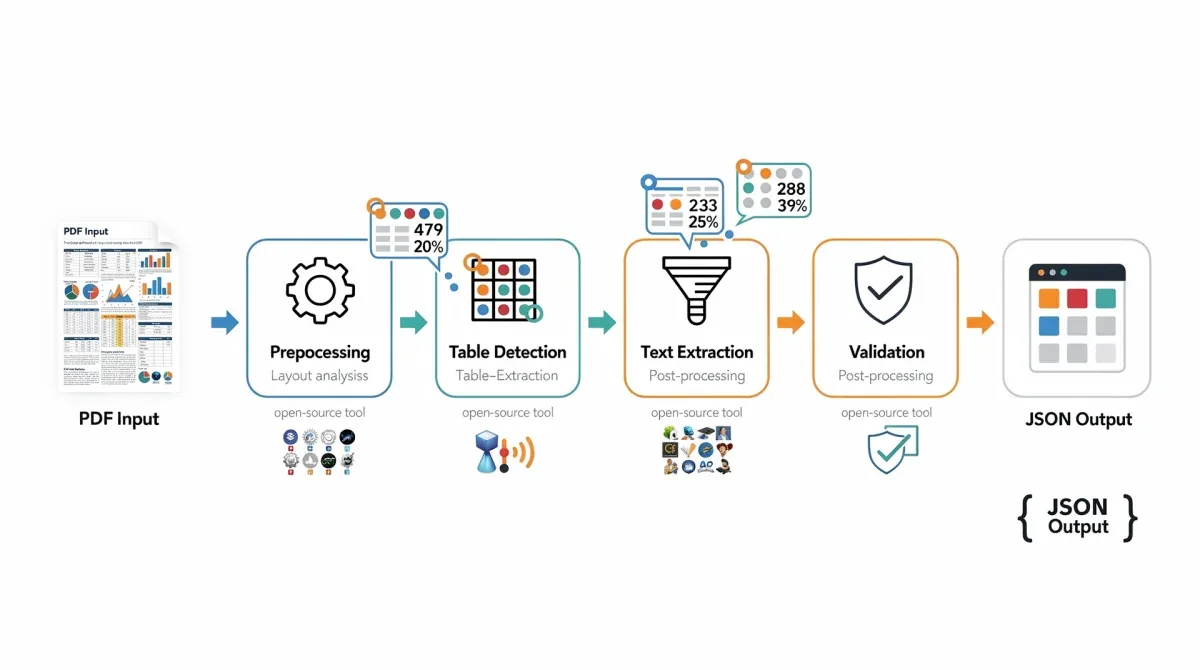
Implementing table extraction with PDF.js typically involves iterating through the text items, analyzing their positions, and grouping them into rows and columns. This requires custom logic, but the advantage of client-side execution is significant. It eliminates the need for server-side processing, which can be costly and introduce latency. For applications where data privacy is paramount, keeping the PDF processing within the user's browser is a major benefit. Furthermore, the JavaScript ecosystem offers a wealth of libraries for data manipulation, making it easier to process the extracted data into desired formats.
- Client-side rendering: Processes PDFs directly in the browser.
- Text and layout access: Extracts raw text with coordinates and styles.
- Privacy-focused: No server interaction for data extraction.
- Interactive applications: Enables user-driven table selection and extraction.
PDF.js is an excellent choice for developers building web applications that require PDF interaction and data extraction. While it demands custom development for table parsing, the benefits of client-side processing, enhanced privacy, and a responsive user experience are considerable. Its open-source nature ensures a vibrant community and continuous improvements, making it a robust foundation for next-generation web-based document processing tools. For a truly interactive and secure PDF data extraction experience, PDF.js provides a unique and powerful solution.
PyPDF2: fundamental PDF manipulation and text access
PyPDF2 is a pure-Python library designed for working with PDF documents. While it's primarily known for its capabilities in splitting, merging, cropping, and transforming PDF files, it also provides fundamental access to text content. Unlike more specialized table extraction tools, PyPDF2 offers a lower-level interface to the PDF structure, allowing developers to extract raw text from pages. This capability, while not directly providing structured tables, serves as a crucial starting point for custom parsing routines, especially when combined with other text processing libraries.
For scenarios where you need to extract all text from a PDF page and then apply your own logic to identify and structure tables, PyPDF2 can be very useful. It handles various PDF features like encryption and compression, ensuring that a wide range of documents can be processed. The extracted text can then be analyzed using regular expressions, string matching, or even machine learning models to detect patterns indicative of tabular data. This approach offers flexibility for highly specific or unusual table formats that might not be easily handled by predefined table extraction algorithms.
Leveraging PyPDF2 for foundational text extraction
PyPDF2 is often used in conjunction with other libraries. For instance, you might use PyPDF2 to extract all text from a PDF, then pass that text to a library like Pandas for further analysis and table reconstruction. This modular approach allows developers to combine the strengths of different tools, creating a highly tailored extraction pipeline. Its simplicity and widespread use within the Python community make it a reliable choice for basic PDF text access, forming a solid base upon which more complex data extraction logic can be built. The library is also lightweight, making it suitable for environments where resource consumption is a concern.
- Basic PDF manipulation: Splitting, merging, cropping pages.
- Raw text extraction: Accesses text content from PDF pages.
- Handles encryption: Can process password-protected PDFs.
- Foundation for custom parsing: Provides text for further processing.
While PyPDF2 may not be a plug-and-play solution for table extraction, its foundational capabilities make it an invaluable tool in a developer's arsenal. For those who need to perform basic PDF operations and then build custom text analysis layers on top, PyPDF2 provides a robust and efficient starting point. Its open-source nature and active community ensure that it remains a relevant and well-supported library for various PDF processing tasks, including as a component in a larger table extraction strategy.
PDFPlumber: precise layout-aware text and table extraction
PDFPlumber is a Python library that builds on PDFMiner.six, offering a more user-friendly and feature-rich interface for extracting text, tables, and other data from PDFs. Its key strength lies in its ability to understand the visual layout of a PDF, treating it like a canvas. This layout awareness allows PDFPlumber to accurately identify text boxes, lines, and images, which are crucial elements for delineating and extracting tables, even those without explicit borders. It simplifies the process of interacting with PDF elements by providing convenient methods for accessing specific regions and objects.
For table extraction, PDFPlumber offers robust methods that can detect tables based on lines, whitespace, or a combination of both. It can automatically infer table settings and extract data into structured formats like lists of lists or Pandas DataFrames. This makes it significantly easier to work with than raw PDFMiner.six output, while still offering a high degree of control. Developers can define custom table settings, including row and column detection parameters, to fine-tune extraction for particular document types, achieving impressive accuracy rates even on complex layouts.
Advanced table features of PDFPlumber
PDFPlumber's visual debugging capabilities are a major advantage. Users can extract a page, draw detected lines, tables, and text boxes on it, and visually verify the parsing results. This interactive feedback loop is incredibly helpful for adjusting parameters and ensuring that the tool is correctly identifying the desired data. Its ability to extract text and tables with an understanding of their spatial relationships makes it a powerful choice for processing a wide array of PDF documents, from financial reports to academic papers.
- Layout awareness: Understands visual structure of PDFs.
- Line and whitespace detection: Robust table identification methods.
- Integrated data structures: Outputs to lists of lists or Pandas DataFrames.
- Visual debugging: Helps refine extraction parameters with visual feedback.
The combination of high-level table extraction functionality and granular control makes PDFPlumber an excellent choice for developers and data scientists seeking a balance between ease of use and powerful customization. Its open-source nature, coupled with active development and a supportive community, ensures that it remains a cutting-edge tool for PDF data extraction. For those who need to reliably extract complex tables with high accuracy and minimal fuss, PDFPlumber stands out as a highly capable and versatile solution.
| Tool Name | Key Features for Table Extraction |
|---|---|
| Camelot | Lattice and Stream methods, granular control, visual debugging. |
| Tabula-py | Python wrapper for Tabula, area selection, automatic detection, OCR compatibility. |
| PDFMiner.six | Full PDF parsing, text coordinates, customizable for bespoke solutions. |
| PDFPlumber | Layout-aware, line/whitespace detection, visual debugging, builds on PDFMiner.six. |
Frequently asked questions about PDF table extraction
What makes open-source tools preferable for PDF table extraction?▼Open-source tools offer transparency, allowing users to inspect and modify the code. This fosters community-driven improvements, ensures adaptability to unique document structures, and often provides greater control over the extraction process. They are also typically free, reducing costs for development and deployment.
How do these tools achieve such high accuracy with complex PDF tables?▼High accuracy is achieved through sophisticated algorithms that interpret visual cues like lines, whitespace, and text alignment. Tools like Camelot and PDFPlumber use layout-aware parsing, while others provide granular control for users to define table areas and parameters, effectively adapting to diverse table complexities.
Can these open-source tools handle scanned PDF documents for table extraction?▼Yes, most open-source tools can process scanned PDFs, but they often require integration with an external Optical Character Recognition (OCR) engine first. OCR converts the image-based text into selectable text, which then allows the table extraction algorithms to function effectively and accurately.
What output formats do these open-source PDF parsing tools typically support?▼These tools commonly support a variety of output formats to facilitate data integration. Popular options include CSV (Comma Separated Values), JSON (JavaScript Object Notation), Excel spreadsheets, and Pandas DataFrames, making the extracted data easily usable in various analytical and development environments.
Which tool is best for developers needing highly customized PDF table extraction?▼For highly customized solutions, PDFMiner.six or PDFPlumber (which builds on PDFMiner.six) are often preferred. They provide lower-level access to PDF elements and layout information, allowing developers to build bespoke parsing logic tailored to extremely unique or challenging document structures that off-the-shelf solutions might miss.
Conclusion
The journey through these five open-source document parsing tools reveals a powerful landscape of solutions for extracting complex PDF tables with remarkable accuracy. From the dual-method precision of Camelot to the web-centric capabilities of PDF.js, and the foundational flexibility of PDFMiner.six, each tool offers distinct advantages tailored to different use cases and technical expertise levels. Whether you are a data scientist, a web developer, or an engineer building complex data pipelines, the open-source community provides robust, customizable, and often free alternatives to proprietary solutions. Embracing these tools not only enhances efficiency and reduces manual errors but also empowers organizations to unlock the vast amounts of data trapped within their PDF documents, driving better insights and informed decision-making in an increasingly data-dependent world.
