Wi-Fi 7 Mesh Router Buying Guide: 5 Specs for 2026 Upgrades
Upgrading to a Wi-Fi 7 mesh router in 2026 requires understanding key specifications like multi-link operation and 320 MHz channels to ensure a future-proof, high-performance home network.
Considering a significant upgrade to your home network? The Wi-Fi 7 Mesh Router is poised to redefine connectivity in 2026, promising unprecedented speeds and efficiency. Before you make the leap, understanding the crucial specifications is essential to ensure your investment truly future-proofs your digital life.
Understanding Wi-Fi 7: The Next Generation of Connectivity
Wi-Fi 7, officially known as 802.11be or Extremely High Throughput (EHT), represents a monumental leap forward in wireless technology. It's not just about faster speeds; it's about a fundamental shift in how wireless networks handle data, especially in congested environments. This new standard is designed to meet the escalating demands of modern households, which are increasingly filled with bandwidth-hungry devices, from 8K streaming to virtual reality (VR) and augmented reality (AR) applications.
The core philosophy behind Wi-Fi 7 is to maximize throughput and minimize latency, creating a more responsive and reliable internet experience. This is achieved through several innovative technologies that work in concert to optimize spectral efficiency and network capacity. For anyone planning a network upgrade, understanding these foundational principles is crucial to appreciating the value a Wi-Fi 7 mesh router brings.
Key Wi-Fi 7 Enhancements
- 320 MHz Channels: This is a game-changer, doubling the channel width available in Wi-Fi 6E. Wider channels mean more data can be transmitted simultaneously, leading to significantly higher speeds, particularly in the 6 GHz band.
- 4096-QAM (Quadrature Amplitude Modulation): This advanced modulation scheme allows more data to be packed into each signal, increasing theoretical peak speeds by 20% compared to Wi-Fi 6E's 1024-QAM.
- Multi-Link Operation (MLO): Perhaps the most revolutionary feature, MLO allows devices to send and receive data simultaneously across different frequency bands (2.4 GHz, 5 GHz, and 6 GHz). This enhances speed, reduces latency, and improves reliability by providing redundant links.
- Preamble Puncturing: This feature allows Wi-Fi 7 to utilize more of the available spectrum by blocking out narrow interference, effectively "puncturing" holes in a channel to transmit data around the interference rather than abandoning the entire channel.
These innovations are not merely incremental improvements; they represent a holistic approach to network optimization, ensuring that a Wi-Fi 7 mesh router can handle the complex, multi-device demands of a 2026 smart home with ease. The ability to dynamically adapt to network conditions and optimize data flow across multiple bands makes Wi-Fi 7 a truly intelligent networking solution.

1. Multi-Link Operation (MLO): The Game Changer for Speed and Reliability
Multi-Link Operation (MLO) is arguably the most transformative feature of Wi-Fi 7, fundamentally changing how devices communicate with the network. Unlike previous Wi-Fi standards where devices typically connected to a single band (2.4 GHz, 5 GHz, or 6 GHz) at a time, MLO allows devices to simultaneously use multiple frequency bands and channels. This simultaneous usage offers a significant boost in both speed and reliability, making it a critical specification for any discerning buyer considering a Wi-Fi 7 Mesh Router.
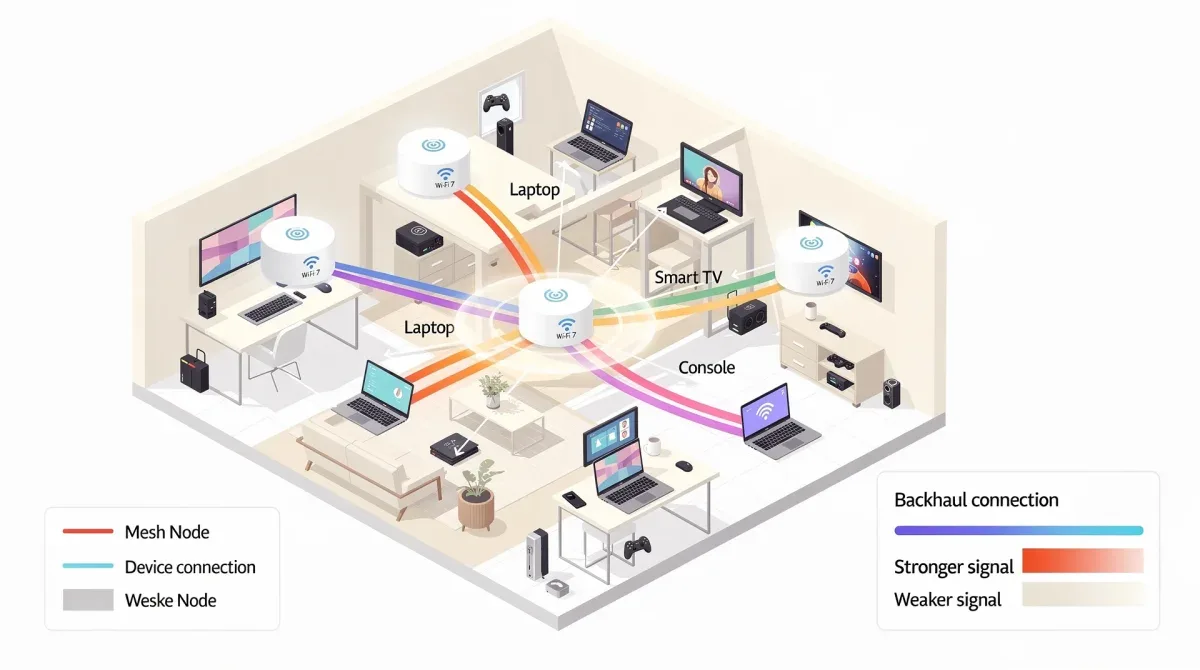
Imagine your internet connection as a highway. In previous Wi-Fi generations, your device would pick one lane and stick to it. With MLO, your device can now use multiple lanes simultaneously, effectively merging the capacity of several lanes into one super-highway. This means data can be transmitted and received much faster, as the aggregate bandwidth of all active links is utilized. Furthermore, MLO provides a layer of redundancy; if one link experiences interference or congestion, data can seamlessly shift to another available link, ensuring a more stable and uninterrupted connection.
Types of MLO and Their Benefits
- Enhanced Multi-Link Single Radio (eMLSR): This mode allows a single radio to switch rapidly between different bands or channels, optimizing for the best available link at any given moment. While not true simultaneous operation, it significantly reduces latency and improves efficiency compared to older standards.
- Multi-Link Multi-Radio (MLMR): This is the more advanced form, enabling a device to actively transmit and receive data across multiple radios and bands concurrently. This provides the highest performance gains, combining bandwidth and offering superior resilience against interference.
When evaluating a Wi-Fi 7 mesh router, confirming its support for advanced MLMR capabilities is essential. This ensures you're getting the full benefit of Wi-Fi 7's ability to aggregate bandwidth and maintain robust connections across your entire home. MLO is particularly beneficial for latency-sensitive applications like online gaming, VR/AR, and video conferencing, where even minor delays can significantly impact user experience. It's a cornerstone technology that truly differentiates Wi-Fi 7 from its predecessors and is a non-negotiable spec for a 2026 upgrade.
2. 320 MHz Channels in the 6 GHz Band: Unleashing Raw Speed
The introduction of 320 MHz channels within the 6 GHz band is another cornerstone feature of Wi-Fi 7, directly impacting the raw speed and throughput capabilities of your network. Prior to Wi-Fi 7, the widest channels available were 160 MHz. By doubling this to 320 MHz, Wi-Fi 7 effectively doubles the data capacity of a single channel, leading to unprecedented wireless speeds. This is particularly significant in the 6 GHz band, which offers a vast, uncluttered spectrum ideal for these wider channels.
The 6 GHz band is relatively new, having been opened up for Wi-Fi use with Wi-Fi 6E. Its primary advantage is the lack of legacy interference from older Wi-Fi devices, which primarily operate in the 2.4 GHz and 5 GHz bands. This clean spectrum makes it perfect for implementing ultra-wide 320 MHz channels without encountering the congestion issues that plague older bands. For consumers seeking the absolute fastest wireless connections, especially for high-bandwidth activities, the ability of a Wi-Fi 7 Mesh Router to utilize these wide channels is paramount.
Maximizing Throughput with Wider Channels
The benefit of 320 MHz channels is straightforward: more bandwidth equals more data transmitted per unit of time. This translates directly to faster downloads, smoother 8K video streaming, and virtually lag-free VR experiences. While theoretical speeds often differ from real-world performance, the sheer capacity offered by 320 MHz channels ensures that your network has ample headroom to handle multiple demanding applications simultaneously.
However, it's important to note that to fully leverage 320 MHz channels, your client devices (laptops, smartphones, etc.) must also support Wi-Fi 7 and its wider channel capabilities. As 2026 approaches, more devices are expected to integrate Wi-Fi 7, making this a increasingly relevant specification. When selecting a Wi-Fi 7 mesh router, ensure it explicitly supports 320 MHz channels in the 6 GHz band to unlock its full potential. This feature, combined with MLO, creates a formidable foundation for a high-performance home network.
3. Advanced QoS and Traffic Prioritization: Ensuring Critical Performance
In a bustling smart home of 2026, where dozens of devices compete for bandwidth, effective Quality of Service (QoS) and intelligent traffic prioritization are no longer luxuries but necessities. A top-tier Wi-Fi 7 Mesh Router must offer advanced QoS features to ensure that critical applications, such as video calls, online gaming, or smart home security feeds, receive the bandwidth and low latency they require, even when the network is under heavy load. Without robust QoS, your 8K stream might buffer while someone else is downloading a large file, or your video conference could stutter during a gaming session.
Wi-Fi 7 enhances QoS through several mechanisms, including improved resource allocation and scheduling. This allows the router to not just identify different types of traffic but also to intelligently manage and prioritize them. For instance, real-time applications like voice and video benefit from deterministic latency, while bulk downloads can be assigned lower priority without negatively impacting the overall user experience for critical tasks. This intelligent management is crucial for maintaining a smooth and responsive network across a diverse range of connected devices.
Customizable Prioritization and Application Awareness
- Application-aware QoS: The ability to automatically detect and prioritize specific applications (e.g., Zoom, Netflix, Xbox Live) without manual configuration.
- Device-level prioritization: Allowing you to assign higher priority to specific devices in your home, ensuring their performance is always optimal.
- Bandwidth allocation controls: Tools that let you reserve minimum bandwidth for certain activities or devices, preventing bandwidth hogging.
- Dynamic management: A system that can adapt to changing network conditions and automatically adjust priorities to maintain performance.
These features move beyond basic QoS, offering a sophisticated level of control that ensures your network performs exactly as you need it to. For families with diverse internet usage patterns, or homes heavily reliant on smart devices and cloud services, advanced QoS capabilities are essential. A Wi-Fi 7 mesh router with superior traffic prioritization will provide a consistently high-quality experience for everyone, regardless of what they're doing online.
4. Enhanced Security Protocols: Protecting Your Digital Fortress
As our lives become increasingly intertwined with our home networks, the importance of robust security cannot be overstated. A Wi-Fi 7 Mesh Router in 2026 must offer cutting-edge security protocols to protect your data, privacy, and connected devices from evolving cyber threats. While Wi-Fi 7 primarily focuses on performance enhancements, it builds upon the strong security foundations laid by its predecessors, particularly Wi-Fi 6 and Wi-Fi 6E, which mandated WPA3.
WPA3 (Wi-Fi Protected Access 3) is the current gold standard for Wi-Fi security, offering significant improvements over WPA2. It provides stronger encryption, more robust authentication, and enhanced privacy protections, even on open networks. For a mesh system, where multiple nodes are spread throughout your home, ensuring consistent and strong security across all access points is vital. A lapse in security on even one node could compromise your entire network.
Beyond WPA3: Integrated Security Features
While WPA3 support is non-negotiable, look for Wi-Fi 7 mesh routers that integrate additional security features, such as:
- Regular firmware updates: Essential for patching vulnerabilities and staying ahead of new threats. Automatic updates are a significant convenience and security booster.
- Built-in antivirus/anti-malware: Some high-end routers include integrated security suites that scan network traffic for malicious content.
- Parental controls: Features that allow you to manage internet access, filter content, and set time limits for specific devices or users.
- VPN server/client capabilities: Enabling secure remote access to your home network or routing all network traffic through a VPN for enhanced privacy.
- IoT security: Dedicated features to isolate and protect vulnerable smart home devices from potential attacks.
The best Wi-Fi 7 mesh systems will offer a comprehensive security package, providing not just strong encryption but also active threat detection and management tools. This holistic approach ensures that your home network remains a secure environment for all your digital activities, giving you peace of mind in an increasingly connected world. Prioritizing security is just as important as prioritizing speed when making your upgrade decision.
5. Multi-Gigabit WAN/LAN Ports: Eliminating Bottlenecks
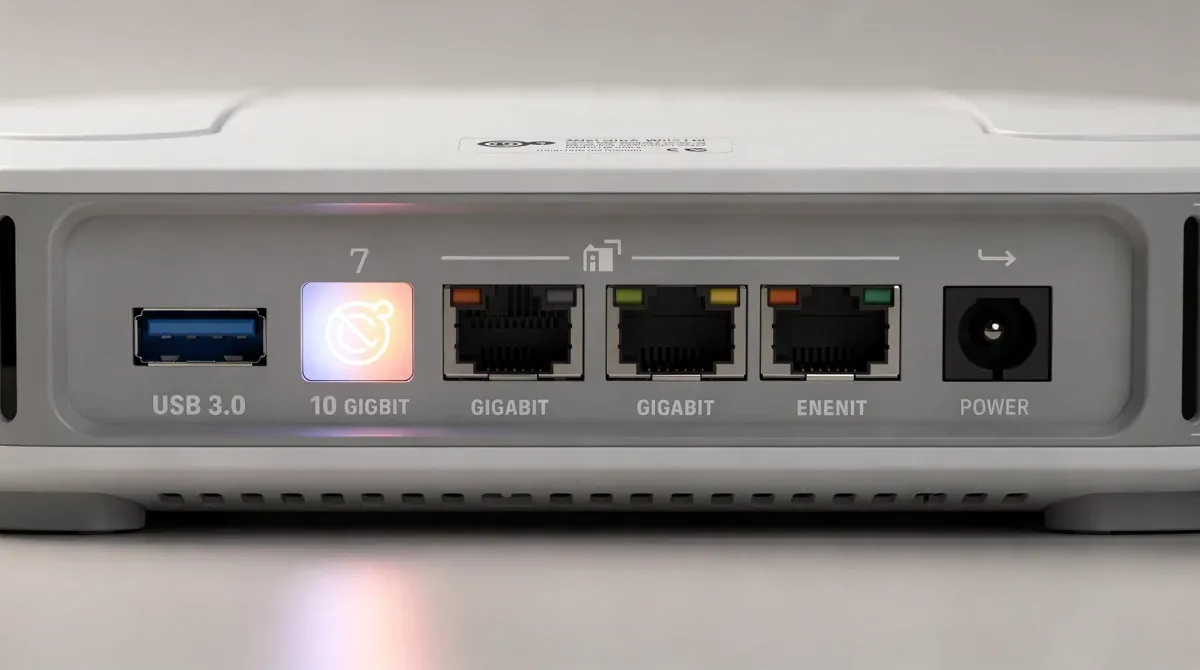
While wireless speeds are the primary focus of Wi-Fi 7, the wired backbone of your network is equally important. A high-performance Wi-Fi 7 Mesh Router needs to be equipped with multi-gigabit WAN (Wide Area Network) and LAN (Local Area Network) ports to fully capitalize on the incredible wireless speeds it offers. Without these high-speed wired connections, your blazing-fast Wi-Fi could be bottlenecked by a slow internet connection or outdated internal network infrastructure.
As internet service providers (ISPs) increasingly offer multi-gigabit internet plans (2.5 Gbps, 5 Gbps, and even 10 Gbps), your router's WAN port must be capable of handling these speeds. Similarly, for devices that benefit most from wired connections—such as network-attached storage (NAS) devices, high-end gaming PCs, or media servers—multi-gigabit LAN ports are essential. These ports ensure that data can flow seamlessly and at maximum speed between your wired devices and the mesh network, preventing any wired bottlenecks from throttling your overall network performance.
Future-Proofing Your Wired Network
When selecting a Wi-Fi 7 mesh router system, pay close attention to the number and type of multi-gigabit ports available:
- WAN Port Speed: Look for at least one 2.5 Gbps WAN port, with 5 Gbps or even 10 Gbps being ideal if your ISP offers such plans or if you anticipate upgrading in the near future.
- LAN Port Speeds and Quantity: Ensure the main router and potentially some satellite nodes have at least one or two 2.5 Gbps LAN ports. For power users, 5 Gbps or 10 Gbps LAN ports are a significant advantage for connecting high-speed wired devices.
- Link Aggregation: Some advanced routers offer link aggregation, allowing you to combine multiple standard Gigabit Ethernet ports into a single, faster logical link, though this is often a less elegant solution than native multi-gigabit ports.
These multi-gigabit ports are crucial for future-proofing your network. Even if your current internet plan doesn't exceed 1 Gbps, investing in a router with faster ports prepares you for future ISP upgrades. Furthermore, they ensure that your internal network can handle the massive data transfers that Wi-Fi 7 enables, allowing you to fully experience the benefits of EHT across both your wireless and wired devices. Don't let your wired connections become the weakest link in your advanced Wi-Fi 7 ecosystem.
Choosing Your Wi-Fi 7 Mesh Router: A Strategic Decision
The decision to upgrade to a Wi-Fi 7 Mesh Router in 2026 is an investment in the future of your home network. It's about more than just incremental speed gains; it's about adopting a technology designed to handle the complexities and demands of an increasingly connected world. By focusing on the five critical specifications—Multi-Link Operation (MLO), 320 MHz channels in the 6 GHz band, advanced QoS and traffic prioritization, enhanced security protocols, and multi-gigabit WAN/LAN ports—you ensure your purchase is truly future-proof and capable of delivering an unparalleled wireless experience.
Each of these specifications plays a vital role in creating a robust, fast, secure, and responsive network. MLO and 320 MHz channels provide the raw speed and efficiency, while advanced QoS ensures that this speed is intelligently managed for all your diverse applications. Enhanced security protects your digital life, and multi-gigabit ports eliminate wired bottlenecks, allowing your entire network to perform at its peak. Together, these features make Wi-Fi 7 a compelling upgrade for anyone serious about their home connectivity.
Evaluating Your Needs and Future Growth
- Home size and layout: A mesh system is ideal for larger homes or those with complex layouts, ensuring seamless coverage.
- Number of devices: The more devices, especially bandwidth-intensive ones, the more you'll benefit from Wi-Fi 7's capacity.
- Internet plan: Ensure your router's WAN port can handle your current and anticipated internet speeds.
- Budget: While Wi-Fi 7 routers will be a premium investment, think long-term about the value of future-proofing.
By carefully weighing these factors against the essential Wi-Fi 7 specifications, you can make an informed decision that will empower your home network for years to come. The right Wi-Fi 7 mesh router won't just improve your internet; it will transform your entire digital experience, making buffering, lag, and dead zones a distant memory.
| Key Specification | Why It Matters for Wi-Fi 7 |
|---|---|
| Multi-Link Operation (MLO) | Aggregates bandwidth across bands for higher speeds and improved reliability. |
| 320 MHz Channels (6 GHz) | Doubles data capacity for peak wireless speeds and reduced congestion. |
| Advanced QoS | Prioritizes critical traffic (gaming, streaming) for consistent performance. |
| Multi-Gigabit Ports | Eliminates wired bottlenecks, supporting multi-gigabit internet and LAN devices. |
Frequently Asked Questions About Wi-Fi 7 Mesh Routers
What is the main advantage of Wi-Fi 7 over Wi-Fi 6E?▼Wi-Fi 7 offers significantly higher speeds and lower latency through features like Multi-Link Operation (MLO) and 320 MHz channels. While Wi-Fi 6E introduced the 6 GHz band, Wi-Fi 7 leverages it more efficiently, providing a more robust and responsive network for demanding applications.
Do I need Wi-Fi 7 compatible devices to benefit from a Wi-Fi 7 mesh router?▼To fully experience Wi-Fi 7's advanced features like MLO and 320 MHz channels, your client devices must also support Wi-Fi 7. However, a Wi-Fi 7 router will still improve performance for older devices due to better resource management and less congestion, especially in the 6 GHz band.
How does Multi-Link Operation (MLO) improve network performance?▼MLO allows devices to simultaneously send and receive data across multiple frequency bands (2.4 GHz, 5 GHz, 6 GHz). This aggregates bandwidth for higher speeds and provides redundancy, improving reliability and reducing latency by seamlessly switching between links if one experiences interference.
Is a Wi-Fi 7 mesh router worth the investment in 2026?▼For homes with numerous connected devices, multi-gigabit internet plans, or users engaging in bandwidth-intensive activities like 8K streaming, VR/AR, and online gaming, a Wi-Fi 7 mesh router is a worthwhile investment. It future-proofs your network, offering superior speed, stability, and efficiency.
What security features should I look for in a Wi-Fi 7 mesh system?▼Beyond mandatory WPA3 encryption, prioritize features like regular, automatic firmware updates, integrated antivirus/anti-malware protection, robust parental controls, and dedicated IoT security measures. These provide a comprehensive defense against evolving cyber threats and ensure a secure home network environment.
Conclusion
Upgrading to a Wi-Fi 7 mesh router is a strategic move for anyone looking to future-proof their home network in 2026. By focusing on the five essential specifications—Multi-Link Operation, 320 MHz channels, advanced QoS, enhanced security, and multi-gigabit ports—consumers can make an informed decision that will unlock unprecedented speeds, reliability, and security. This investment ensures your network is ready for the next wave of bandwidth-hungry applications and devices, providing a seamless and high-performance digital experience for years to come.
